
🙌🙌 OpenHands: An Open Platform for AI Software Developers as Generalist Agents
Xingyao Wang$^{1,10}$, Boxuan Li$^2$, Yufan Song$^2$, Frank F. Xu$^2$, Xiangru Tang$^3$, Mingchen Zhuge$^6$, Jiayi Pan$^4$, Yueqi Song$^2$, Bowen Li, Jaskirat Singh$^7$, Hoang H. Tran$^8$, Fuqiang Li, Ren Ma, Mingzhang Zheng, Bill Qian$^3$, Yanjun Shao$^3$, Niklas Muennighoff$^5$, Yizhe Zhang, Binyuan Hui$^9$, Junyang Lin$^9$, Robert Brennan$^{10}$, Hao Peng$^1$, Heng Ji$^1$, Graham Neubig$^{2,10}$
$^1$UIUC $^2$CMU $^3$Yale $^4$UC Berkeley $^5$Contextual AI $^6$KAUST $^7$ANU $^8$HCMUT $^9$Alibaba $^{10}$All Hands AI
[email protected], [email protected]
Abstract
Software is one of the most powerful tools that we humans have at our disposal; it allows a skilled programmer to interact with the world in complex and profound ways. At the same time, thanks to improvements in large language models (LLMs), there has also been a rapid development in AI agents that interact with and affect change in their surrounding environments. In this paper, we introduce OpenHands (f.k.a. OpenDevin), a platform for the development of powerful and flexible AI agents that interact with the world in similar ways to those of a human developer: by writing code, interacting with a command line, and browsing the web. We describe how the platform allows for the implementation of new agents, safe interaction with sandboxed environments for code execution, coordination between multiple agents, and incorporation of evaluation benchmarks. Based on our currently incorporated benchmarks, we perform an evaluation of agents over 15 challenging tasks, including software engineering (e.g., SWE-BENCH) and web browsing (e.g., WEBARENA), among others. Released under the permissive MIT license, OpenHands is a community project spanning academia and industry with more than 2.1K contributions from over 188 contributors.
Code https://github.com/All-Hands-AI/OpenHands
Slack http://bit.ly/OpenHands-Slack
Executive Summary: OpenHands is an open-source platform that lets AI agents act like human software developers by writing and editing code, running commands in a terminal, and browsing the web. The work addresses the growing need for practical tools to build, test, and safely deploy AI agents that can perform complex, real-world tasks amid rapid advances in large language models.
The project set out to create a flexible, community-driven framework that supports many types of agents, provides secure execution environments, and enables consistent evaluation on established benchmarks. Researchers and developers from academia and industry contributed code, agents, and testing infrastructure under an MIT license.
The team built the platform around an event-stream architecture for agent-environment interaction, a Docker-based sandbox for safe code execution and web browsing, a library of reusable skills, support for multi-agent collaboration, and integration of 15 benchmarks spanning software engineering (such as SWE-Bench Lite), web navigation (WebArena), and general assistance tasks. They tested a generalist CodeAct agent and several specialist variants across these tasks using models like GPT-4o and Claude 3.5 Sonnet, comparing results against prior open-source baselines without task-specific prompt tuning.
The CodeAct agent achieved competitive results in multiple domains, reaching 26% success on SWE-Bench Lite, 15.3% on WebArena, and 52% on the GPQA graduate-level science questions. The same unmodified generalist agent performed well across categories, while multi-agent setups and specialized variants showed further gains on narrower tasks. The platform also proved more comprehensive than existing frameworks, uniquely combining a graphical interface, standardized tools, full sandbox execution, web browsing, human oversight, and built-in evaluation.
These outcomes indicate that a single, extensible software-oriented interface can support capable generalist agents without heavy customization, lowering barriers to agent development and enabling faster progress on practical applications. The platform’s safety features and evaluation capabilities also support responsible research and potential real-world use in productivity and automation.
Organizations should adopt OpenHands for prototyping and benchmarking AI agents, contribute specialized agents or tools to the community, and explore integration into internal workflows. Further work is needed on multi-modal capabilities, improved file editing for long documents, and stronger overall agent reliability before large-scale deployment.
The results rest on a broad but still limited set of benchmarks and models; agents continue to struggle with very long or complex tasks, and real-world performance may vary. Overall confidence in the platform’s utility and the reported performance levels is moderate to high for research and early development use.
1. Introduction
Section Summary: OpenHands is a new open-source platform that helps researchers and developers build AI agents capable of performing complex real-world tasks by interacting with software environments, much like human programmers or users do. It provides a flexible system for agents to write and edit code, run commands in a safe sandbox, browse the web for information, collaborate with other specialized agents, and be tested on many different benchmarks through an easy-to-use interface. The project has already attracted a large community and aims to speed up progress on safe, capable AI systems beyond just chatbots.
Powered by large language models (LLMs; [1, 2, 3, 4]), user-facing AI systems (such as ChatGPT) have become increasingly capable of performing complex tasks such as accurately responding to user queries, solving math problems, and generating code. In particular, AI agents, systems that can perceive and act upon the external environment, have recently received ever-increasing research focus. They are moving towards performing complex tasks such as developing software ([5]), navigating real-world websites ([6]), doing household chores ([7]), or even performing scientific research ([8, 9]).
As AI agents become capable of tackling complex problems, their development and evaluation have also become challenging. There are numerous recent efforts in creating open-source frameworks that facilitate the development of agents ([10, 11, 12]). These agent frameworks generally include: 1) interfaces through which agents interact with the world (such as JSON-based function calls or code execution), 2) environments in which agents operate, and 3) interaction mechanisms for human-agent or agent-agent communication. These frameworks streamline and ease the development process in various ways (Table 1, § C).
When designing AI agents, we can also consider how human interacts with the world. The most powerful way in which humans currently interact with the world is through software – software powers every aspect of our life, supporting everything from the logistics for basic needs to the advancement of science, technology, and AI itself. Given the power of software, as well as the existing tooling around its efficient development, use, and deployment, it provides the ideal interface for AI agents to interact with the world in complex ways. However, building agents that can effectively develop software comes with its own unique challenges. How can we enable agents to effectively create and modify code in complex software systems? How can we provide them with tools to gather information on-the-fly to debug problems or gather task-requisite information? How can we ensure that development is safe and avoids negative side effects on the users' systems?
In this paper, we introduce OpenHands (f.k.a. OpenDevin), a community-driven platform designed for the development of generalist and specialist AI agents that interact with the world through software. [^1] It features:
[^1]: While initially inspired by AI software engineer Devin ([13]), OpenHands has quickly evolved to support much wider range of applications beyond software engineering through diverse community contributions.
- (1) An interaction mechanism which allows user interfaces, agents, and environments to interact through an event stream architecture that is powerful and flexible (§ 2.1).
- (2) A runtime environment that consists of a docker-sandboxed operating system with a bash shell, a web browser, and IPython server that the agents can interact with (§ 2.2).
- (3) An interface allowing the agent to interact with the environment in a manner similar to actual software engineers (§ 2.3). We provide the capability for agents to a) create and edit complex software, b) execute arbitrary code in the sandbox, and c) browse websites to collect information.
- (4) Multi-agent delegation, allowing multiple specialized agents to work together (§ 2.4).
- (5) Evaluation framework, facilitating the evaluation of agents across a wide range of tasks (§ 4).
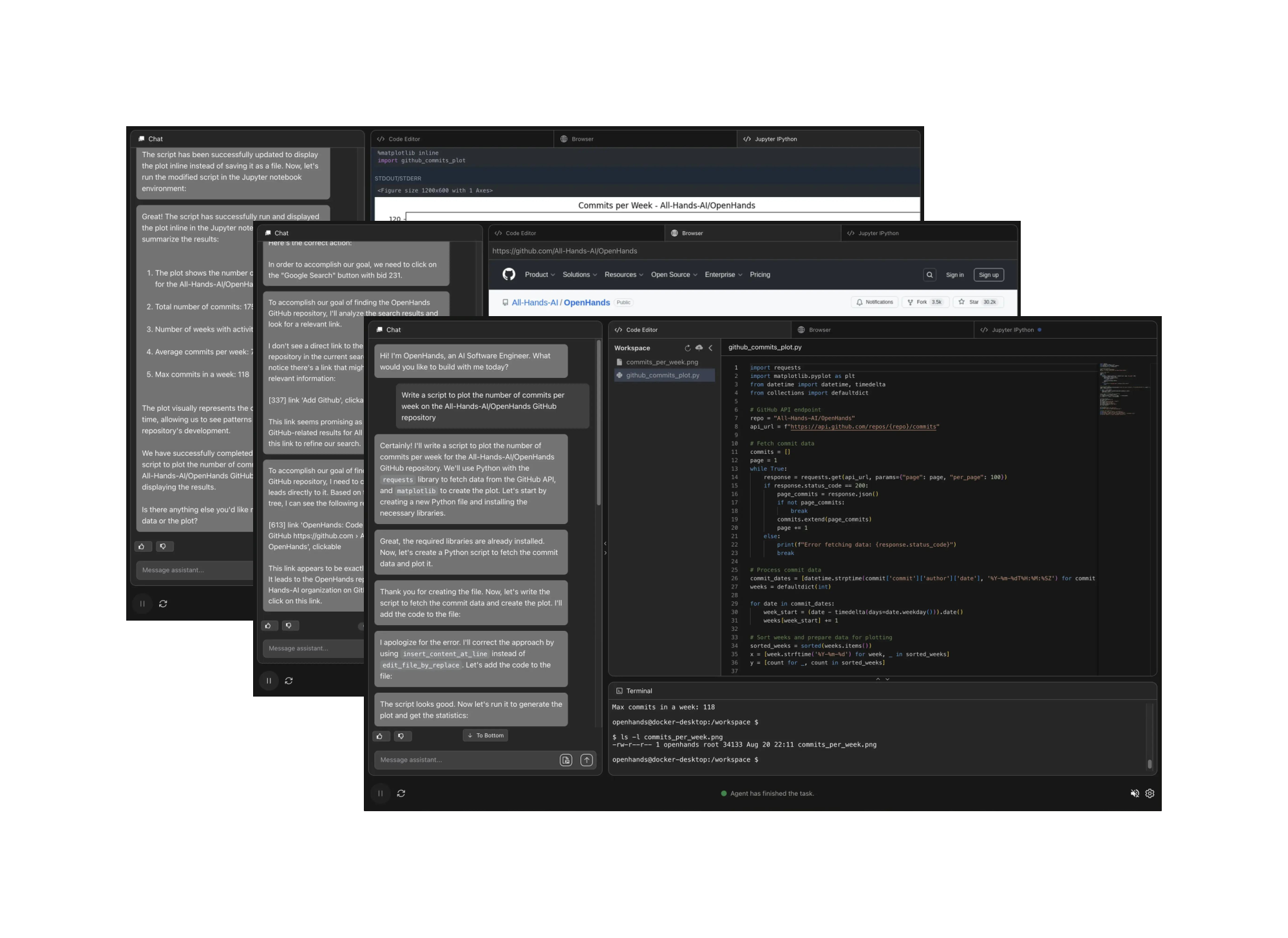
Importantly, OpenHands is not just a conceptual framework, but it also includes a comprehensive and immediately usable implementation of agents, environments, and evaluations. As of this writing, OpenHands includes an agent hub with over 10 implemented agents (§ 3), including a strong generalist agent implemented based on the CodeAct architecture ([14]), with additions for web browsing ([15]) and code editing specialists ([16]). Interaction with users is implemented through a chat-based user interface that visualizes the agent's current actions and allows for real-time feedback (Figure 1, § D). Furthermore, the evaluation framework currently supports 15 benchmarks, which we use to evaluate our agents (§ 4).
Released under a permissive MIT license allowing commercial use, OpenHands is poised to support a diverse array of research and real-world applications across academia and industry. OpenHands has gained significant traction, with 32K GitHub stars and more than 2.1K contributions from over 188 contributors. We envision OpenHands as a catalyst for future research innovations and diverse applications driven by a broad community of practitioners.
2. OpenHands Architecture
Section Summary: OpenHands is built around three core parts that work together to let software agents tackle tasks like coding or web browsing. An agent reads an ongoing record of past actions and results, then decides what to do next by issuing simple commands to run code, execute shell instructions, or control a browser. These commands are carried out inside a secure, isolated container that safely returns the outcomes so the agent can continue working toward the user's goal.
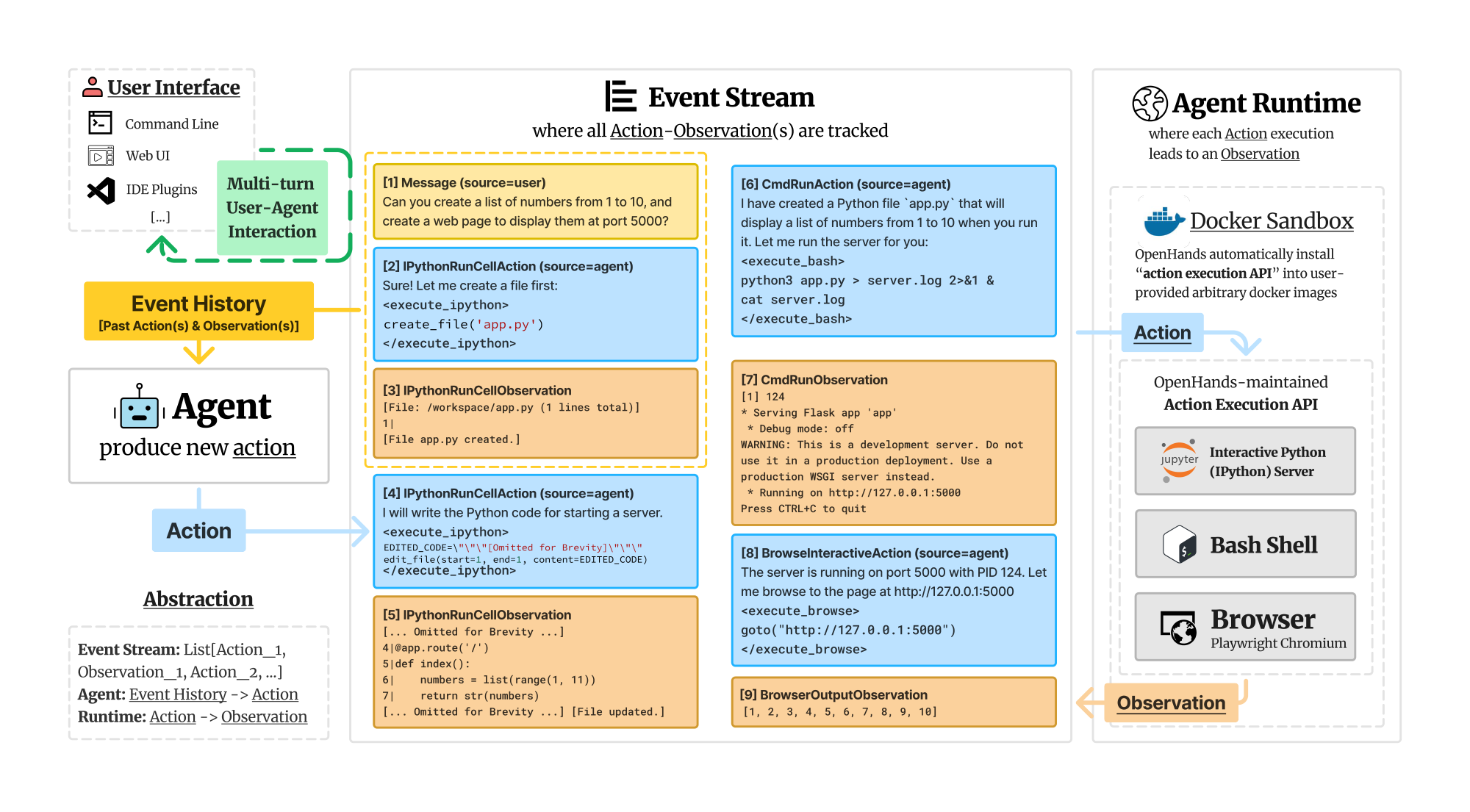
We next describe using OpenHands in detail. In particular, we discuss 1) how to define and implement an agent (§ 2.1), 2) how each action execution leads to an observation (§ 2.2), 3) how to reliably manage and extend commonly used skills for agents (§ 2.3), and 4) how to compose multiple agents together for task solving (§ 2.4). Figure 2 provides an overview.
2.1 Agent
Definition and Implementation
An agent can perceive the state of the environment (e.g., prior actions and observations) and produce an action for execution while solving a user-specified task.
The State and Event Stream. In OpenHands, the state is a data structure that encapsulates all relevant information for the agent's execution. A key component of this state is the event stream, which is a chronological collection of past actions and observations, including the agent's own actions and user interactions (e.g., instructions, feedback). In addition to the event stream, the state incorporates auxiliary information for agent's operation, such as the accumulative cost of LLM calls, metadata to track multi-agent delegation (§ 2.4), and other execution-related parameters.
Actions. Inspired by CodeAct ([14]), OpenHands connects an agent with the environment through a core set of general actions. Actions IPythonRunCellAction and CmdRunAction enable the agent to execute arbitrary Python code and bash commands inside the sandbox environment (e.g., a securely isolated Linux operating system). BrowserInteractiveAction enables interaction with a web browser with a domain-specific language for browsing introduced by BrowserGym ([17]). These actions were chosen to provide a comprehensive yet flexible set of primitives covering most tasks performed by human software engineers and analysts. The action space based on programming languages (PL) is powerful and flexible enough to perform any task with tools in different forms (e.g., Python function, REST API, etc.) while being reliable and easy to maintain ([14]) .
This design is also compatible with existing tool-calling agents that require a list of pre-defined tools ([18]). That is, users can easily define tools using PL supported in primitive actions (e.g., write a Python function for calculator) and make those tools available to the agent through JSON-style function-calling experiences ([19]). Moreover, the framework's powerful PL-based primitives further make it possible for the agents to create tools by themselves (e.g., by generating Python functions, [20]) when API to complete the task is unavailable. Refer to § 2.3 for how these core PL-based actions can be composed into a diverse set of tools.
Observations. Observations describe the environmental changes (e.g., execution result of prior actions, text messages from the human user etc.) that the agent observes.
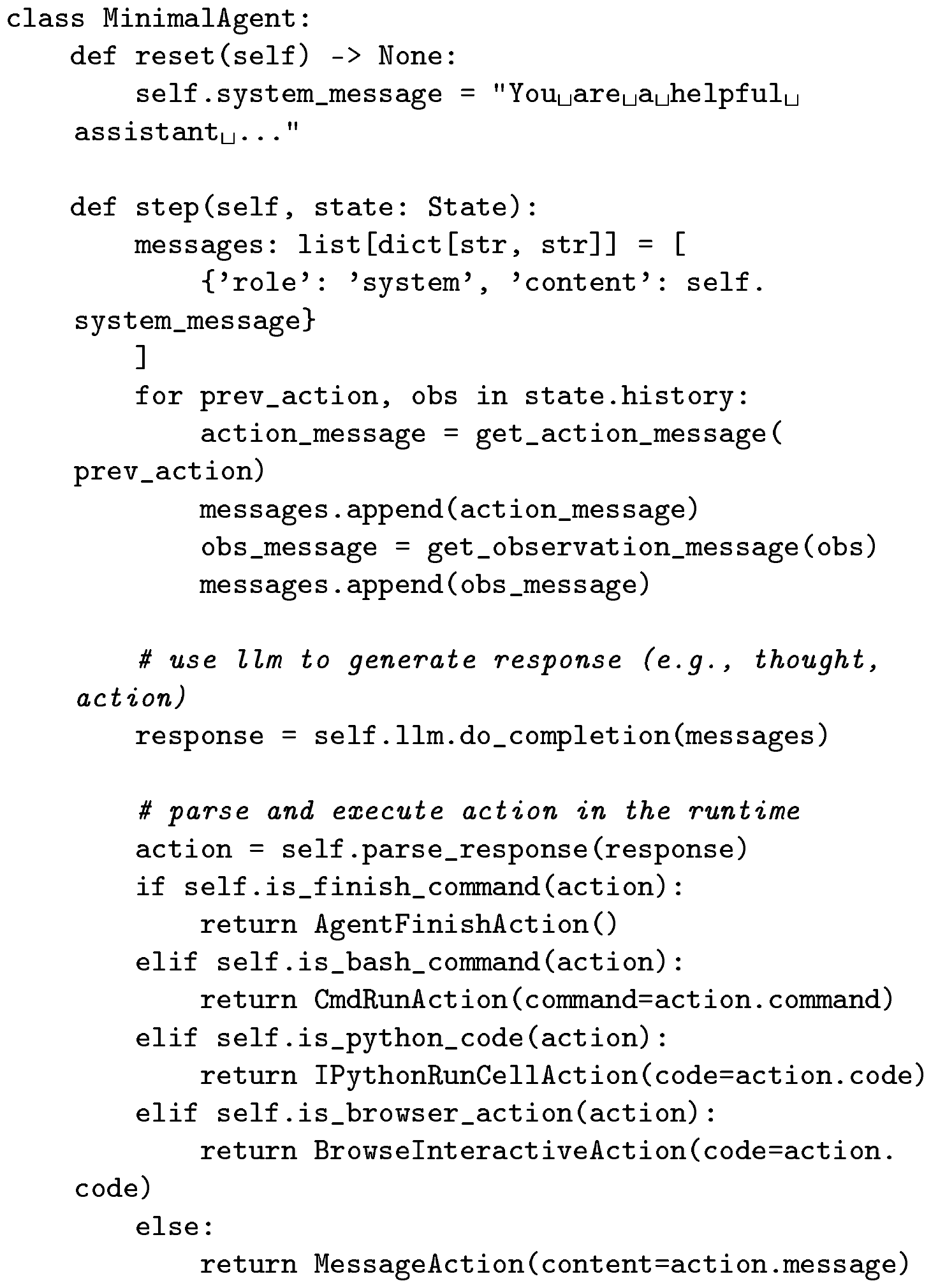
Implement a New Agent. The agent abstraction is designed to be simple yet powerful, allowing users to create and customize agents for various tasks easily. The core of the agent abstraction lies in the step function, which takes the current state as input and generates an appropriate action based on the agent's logic. Simplified example code for the agent abstraction is illustrated in Figure 3. By providing this abstraction, OpenHands allows the users to focus on defining desired agent behavior and logic without worrying about the low-level details of how actions are executed (§ 2.2).
2.2 Agent Runtime: How Execution of Actions Results in Observations
Agent Runtime provides a general environment that equips the agent with an action space comparable to that of human software developers, enabling OpenHands agents to tackle a wide range of software development and web-based tasks, including complex software development workflows, data analysis projects, web browsing tasks, and more. It allows the agent to access a bash terminal to run code and command line tools, utilize a Jupyter notebook for writing and executing code on-the-fly, and interact with a web browser for web-based tasks (e.g., information seeking).
Docker Sandbox. For each task session, OpenHands spins up a securely isolated docker container sandbox, where all the actions from the event stream are executed. OpenHands connects to the sandbox through a REST API server running inside it (i.e., the OpenHands action execution API), executes arbitrary actions (e.g., bash command, python code) from the event stream, and returns the execution results as observations. A configurable workspace directory containing files the user wants the agent to work on is mounted into that secure sandbox for OpenHands agents to access.
OpenHands Action Execution API. OpenHands maintains an API server that runs inside the docker sandbox to listen for action execution requests from the event stream. The API server maintains:
- (1) A bash shell that connects with the operating system environment (specified by the docker image) for command execution.
- (2) A Jupyter IPython server to handle interactive python ([21]) code execution requests and return the execution results back to the event stream.
- (3) A Chromium browser based on [22]. The provider provides a set of action primitives defined by BrowserGym ([15, 17]), such as navigation, clicking, typing, and scrolling. The full set of actions is detailed in § J. After executing these actions, the browser runtime provides a rich set of observations about the current state of the browser, including HTML, DOM, accessibility tree ([23]), screenshot, opened tabs, etc..
Arbitrary Docker Image Support. OpenHands allows agents to run on arbitrary operating systems with different software environments by supporting runtime based on arbitrary docker images. OpenHands implements a build mechanism that takes a user-provided arbitrary docker image and installs OpenHands action execution API into that image to allow for agent interactions. We include a detailed description of OpenHands agent runtime in § F.
2.3 Agent Skills: The Extensible Agent-Computer Interface
SWE-Agent ([16]) highlights the importance of a carefully crafted Agent-Computer Interface (ACI, i.e., specialized tools for particular tasks) in successfully solving complex tasks. However, creating, maintaining, and distributing a wide array of tools can be a daunting engineering challenge, especially when we want to make these tools available to different agent implementations (§ 3). To tackle these, we build an AgentSkills library, a toolbox designed to enhance the capabilities of agents, offering utilities not readily available through basic bash commands or python code.
Easy to create and extend tools. AgentSkills is designed as a Python package consisting of different utility functions (i.e., tools) that are automatically imported into the Jupyter IPython environment (§ 2.2). The ease of defining a Python function as a tool lowers the barrier for community members to contribute new tools to the library. The generality of Python packages also allows different agent implementations to easily leverage these tools through one of our core action IPythonRunCellAction (§ 2.1).
Inclusion criteria and philosophy. In the AgentSkills library, we do not aim to wrap every possible Python package and re-teach agents their usage (e.g., LLM already knows pandas library that can read CSV file, so we don't need to re-create a tool that teaches the agent to read the same file format). We only add a new skill when: (1) it is not readily achievable for LLM to write code directly (e.g., edit code and replace certain lines), and/or (2) it involves calling an external model (e.g., calling a speech-to-text model, or model for code editing ([24])).
Currently supported skills. AgentSkills library includes file editing utilities adapted from SWE-Agent ([16]) and Aider ([25]) like edit_file, which allows modifying an existing file from a specified line; scrolling functions scroll_up and scroll_down for viewing a different part of files. It also contains tools that support reading multi-modal documents, like parse_image and parse_pdf for extracting information from images using vision-language models (e.g., GPT-4V) and reading text from PDFs, respectively. A complete list of supported skills can be found in § I.
2.4 Agent Delegation: Cooperative Multi-agent Interaction
OpenHands allows interactions between multiple agents as well. To this end, we use a special action type AgentDelegateAction, which enables an agent to delegate a specific subtask to another agent. For example, the generalist CodeActAgent, with limited support for web-browsing, can use AgentDelegateAction to delegate web browsing tasks to the specialized BrowsingAgent to perform more complex browsing activity (e.g., navigate the web, click buttons, submit forms, etc.).
```latextable {caption="Table 1: Comparison of different AI agent frameworks (§ C). $\textsc{Swe}$ refers to `software engineering'. Standardized tool library: if framework contains reusable tools for different agent implementations (§ 2.3); Built-in sandbox & code execution: if it supports sandboxed execution of arbitrary agent-generated code; Built-in web browser: if it provides agents access to a fully functioning web browser; Human-AI collaboration: if it enables multi-turn human-AI collaboration (e.g., human can interrupt the agent during task execution and/or provide additional feedback and instructions); AgentHub: if it hosts implementations of various agents (§ 3); Evaluation Framework: if it offers systematic evaluation of implemented agents on challenging benchmarks (§ 4); Agent QC (Quality Control): if the framework integrates tests (§ E) to ensure overall framework software quality."}
\begin{tabular}{ll|ccccccccc} \toprule \textbf{Framework} & \textbf{Domain} & \textbf{\makecell{Graphic\ User Interface}} & \textbf{\makecell{Standardized\ Tool Library}} & \textbf{\makecell{Built-in Sandbox\ & Code Execution}} & \textbf{\makecell{Built-in Web\ Browser}} & \textbf{\makecell{Multi-agent\ Collaboration}} & \textbf{\makecell{Human-AI\ Collaboration}} & \textbf{\makecell{AgentHub}} & \textbf{\makecell{Evaluation\ Framework}} & \textbf{\makecell{Agent\ QC}} \ \midrule
AutoGPT [26] & General & {\textcolor{#007F00}{\CheckmarkBold}} & {\textcolor{red}{\XSolidBrush}} & {\textcolor{red}{\XSolidBrush}} & {\textcolor{red}{\XSolidBrush}} & {\textcolor{red}{\XSolidBrush}} & {\textcolor{red}{\XSolidBrush}} & {\textcolor{#007F00}{\CheckmarkBold}} & {\textcolor{red}{\XSolidBrush}} & {\textcolor{#007F00}{\CheckmarkBold}} \
LangChain ([18]) & General & {\textcolor{red}{\XSolidBrush}} & {\textcolor{#007F00}{\CheckmarkBold}} & {\textcolor{red}{\XSolidBrush}}$^*$ & {\textcolor{red}{\XSolidBrush}}$^*$ & {\textcolor{red}{\XSolidBrush}} & {\textcolor{red}{\XSolidBrush}} & {\textcolor{#007F00}{\CheckmarkBold}} & {\textcolor{red}{\XSolidBrush}} & {\textcolor{red}{\XSolidBrush}} \
MetaGPT ([10]) & General & {\textcolor{red}{\XSolidBrush}} & {\textcolor{#007F00}{\CheckmarkBold}} & {\textcolor{red}{\XSolidBrush}} & {\textcolor{#007F00}{\CheckmarkBold}} & {\textcolor{#007F00}{\CheckmarkBold}} & {\textcolor{red}{\XSolidBrush}} & {\textcolor{#007F00}{\CheckmarkBold}} & {\textcolor{red}{\XSolidBrush}} & {\textcolor{#007F00}{\CheckmarkBold}} \
AutoGen ([12]) & General & {\textcolor{red}{\XSolidBrush}} & {\textcolor{#007F00}{\CheckmarkBold}} & {\textcolor{#007F00}{\CheckmarkBold}} & {\textcolor{#007F00}{\CheckmarkBold}} & {\textcolor{#007F00}{\CheckmarkBold}} & {\textcolor{#007F00}{\CheckmarkBold}} & {\textcolor{#007F00}{\CheckmarkBold}} & {\textcolor{#007F00}{\CheckmarkBold}} & {\textcolor{red}{\XSolidBrush}} \
AutoAgents ([11]) & General & {\textcolor{red}{\XSolidBrush}} & {\textcolor{red}{\XSolidBrush}} & {\textcolor{red}{\XSolidBrush}} & {\textcolor{red}{\XSolidBrush}} & {\textcolor{#007F00}{\CheckmarkBold}} & {\textcolor{red}{\XSolidBrush}} & {\textcolor{red}{\XSolidBrush}} & {\textcolor{red}{\XSolidBrush}} & {\textcolor{red}{\XSolidBrush}} \
Agents ([27]) & General & {\textcolor{red}{\XSolidBrush}} & {\textcolor{red}{\XSolidBrush}} & {\textcolor{red}{\XSolidBrush}} & {\textcolor{red}{\XSolidBrush}} & {\textcolor{#007F00}{\CheckmarkBold}} & {\textcolor{#007F00}{\CheckmarkBold}} & {\textcolor{red}{\XSolidBrush}} & {\textcolor{red}{\XSolidBrush}} & {\textcolor{red}{\XSolidBrush}} \
Xagents ([28]) & General & {\textcolor{#007F00}{\CheckmarkBold}} & {\textcolor{#007F00}{\CheckmarkBold}} & {\textcolor{red}{\XSolidBrush}} & {\textcolor{#007F00}{\CheckmarkBold}} & {\textcolor{#007F00}{\CheckmarkBold}} & {\textcolor{red}{\XSolidBrush}} & {\textcolor{#007F00}{\CheckmarkBold}} & {\textcolor{red}{\XSolidBrush}} & {\textcolor{red}{\XSolidBrush}} \
OpenAgents ([29]) & General & {\textcolor{#007F00}{\CheckmarkBold}} & {\textcolor{red}{\XSolidBrush}} & {\textcolor{#007F00}{\CheckmarkBold}} & {\textcolor{#007F00}{\CheckmarkBold}} & {\textcolor{red}{\XSolidBrush}} & {\textcolor{red}{\XSolidBrush}} & {\textcolor{#007F00}{\CheckmarkBold}} & {\textcolor{red}{\XSolidBrush}} & {\textcolor{red}{\XSolidBrush}} \
GPTSwarm ([30]) & General & {\textcolor{red}{\XSolidBrush}} & {\textcolor{#007F00}{\CheckmarkBold}} & {\textcolor{red}{\XSolidBrush}} & {\textcolor{red}{\XSolidBrush}} & {\textcolor{#007F00}{\CheckmarkBold}} & {\textcolor{#007F00}{\CheckmarkBold}} & {\textcolor{red}{\XSolidBrush}} & {\textcolor{red}{\XSolidBrush}} & {\textcolor{red}{\XSolidBrush}} \
\midrule
AutoCodeRover ([31]) & SWE & {\textcolor{red}{\XSolidBrush}} & {\textcolor{red}{\XSolidBrush}} & {\textcolor{#007F00}{\CheckmarkBold}} & {\textcolor{red}{\XSolidBrush}} & {\textcolor{red}{\XSolidBrush}} & {\textcolor{red}{\XSolidBrush}} & {\textcolor{red}{\XSolidBrush}} & {\textcolor{red}{\XSolidBrush}} & {\textcolor{red}{\XSolidBrush}} \
SWE-Agent ([16]) & SWE & {\textcolor{red}{\XSolidBrush}} & {\textcolor{red}{\XSolidBrush}} & {\textcolor{#007F00}{\CheckmarkBold}} & {\textcolor{red}{\XSolidBrush}} & {\textcolor{red}{\XSolidBrush}} & {\textcolor{red}{\XSolidBrush}} & {\textcolor{red}{\XSolidBrush}} & {\textcolor{red}{\XSolidBrush}} & {\textcolor{red}{\XSolidBrush}} \
\midrule
\textbf{OpenHands} & General & {\textcolor{#007F00}{\CheckmarkBold}} & {\textcolor{#007F00}{\CheckmarkBold}} & {\textcolor{#007F00}{\CheckmarkBold}} & {\textcolor{#007F00}{\CheckmarkBold}} & {\textcolor{#007F00}{\CheckmarkBold}} & {\textcolor{#007F00}{\CheckmarkBold}} & {\textcolor{#007F00}{\CheckmarkBold}} & {\textcolor{#007F00}{\CheckmarkBold}} & {\textcolor{#007F00}{\CheckmarkBold}} \
\bottomrule
\end{tabular}
## 3. AgentHub: A Hub of Community-Contributed Agents

> **Section Summary**: OpenHands offers users a selection of agents contributed by the community, each built on a common framework and suited to different kinds of work. The lineup includes a general-purpose CodeAct Agent that can chat with people or run code commands to edit files, browse the web, and execute programs, along with a straightforward Browsing Agent for web tasks and a GPTSwarm Agent that organizes work through adaptable graphs. People can also create lightweight micro agents that reuse most of an existing agent’s code but add custom instructions for specific jobs.


Based on our agent abstraction (§ 2.1), OpenHands supports a wide range of community-contributed agent implementations for end users to choose from and act as baselines for different agent tasks.

**CodeAct Agent.** CodeActAgent is the default generalist agent based on the CodeAct framework ([14]). At each step, the agent can (1) converse to communicate with humans in natural language to ask for clarification, confirmation, *etc.*, or (2) to perform the task by executing code (*a.k.a.*, **CodeAct**), including executing bash commands, Python code, or browser-specific programming language (§ 2.2). This general action space allows the agent (v1.5 and above) to perform various tasks, including editing files, browsing the web, running programs, etc.

**Browsing Agent.** We implemented a generalist web agent called Browsing Agent, to serve as a simple yet effective baseline for web agent tasks. The agent is similar to that in WebArena ([6]), but with improved observations and actions, with only zero-shot prompting. Full prompts are in § K.

**GPTSwarm Agent.** GPTSwarm ([30]) pioneers the use of optimizable graphs to construct agent systems, unifying language agent frameworks through modularity. Each node represents a distinct operation, while edges define collaboration and communication pathways. This design allows automatic optimization of nodes and edges, driving advancements in creating multi-agent systems.

**Micro Agent(s).** In addition, OpenHands enables the creation of **micro agent**, an agent *specialized* towards a particular task. A micro agent re-uses most implementations from an existing generalist agent (e.g., CodeAct Agent). It is designed to lower the barrier to agent development, where community members can share specialized prompts that work well for their particular use cases.

## 4. Evaluation

> **Section Summary**: The evaluation section of the OpenHands paper describes how the system integrates 15 established benchmarks spanning software engineering tasks like fixing code issues, web browsing activities such as realistic site navigation, and miscellaneous assistance such as question answering or logic problems. It compares a general-purpose CodeAct agent against specialized open-source baselines, showing that the same unmodified agent achieves competitive results across categories when using strong language models. The authors avoid benchmark-specific prompt tweaks and report results without extra hints, highlighting the agent's versatility rather than peak performance on any single task.


```latextable {caption="Table 2: Evaluation benchmarks in OpenHands."}
\begin{tabular}{lll}
\toprule
\textbf{Category}
& \textbf{Benchmark}
& \textbf{Required Capability} \\
\midrule
\multirow{7}{*}{\textbf{Software}}
& SWE-Bench ([5]) & Fixing Github issues \\
& HumanEvalFix ([32]) & Fixing Bugs \\
& BIRD ([33]) & Text-to-SQL \\
& BioCoder ([34]) & Bioinformatics coding \\
& ML-Bench ([35]) & Machine learning coding \\
& Gorilla APIBench ([36]) & Software API calling \\
& ToolQA ([37]) & Tool use \\

\midrule
\multirow{2}{*}{\textbf{Web}}
& WebArena ([6]) & Goal planning \& realistic browsing \\
& MiniWoB++ ([38]) & Short trajectory on synthetic web \\

\midrule
\multirow{6}{*}{\textbf{Misc. Assistance}}
& GAIA ([39]) & Tool-use, browsing, multi-modality \\
& GPQA ([40]) & Graduate-level Google-proof Q\&A \\
& AgentBench ([41]) & Operating system interaction (bash) \\
& MINT ([42]) & Multi-turn math and code problems \\
& Entity Deduction Arena ([43]) & State tracking \& strategic planning \\
& ProofWriter ([44]) & Deductive Logic Reasoning \\

\bottomrule

\end{tabular}
To systematically track progress in building generalist digital agents, as listed in Table 2, we integrate 15 established benchmarks into OpenHands. These benchmarks cover software engineering, web browsing, and miscellaneous assistance. In this section, we compare OpenHands to open-source reproducible baselines that do not perform manual prompt engineering specifically based on the benchmark content. Please note that we use 'OH' as shorthand for OpenHands for the rest of this section for brevity reasons.
4.1 Result Overview
In OpenHands, our goal is to develop general digital agents capable of interacting with the world through software interfaces (as exemplified by the code actions described in § 2.1). We recognize that a software agent should excel not only in code editing but also in web browsing and various auxiliary tasks, such as answering questions about code repositories or conducting online research.
Table 3 showcases a curated set of evaluation results. While OpenHands agents may not achieve top performance in every category, they are designed with generality in mind. Notably, the same CodeAct agent, without any modifications to its system prompt, demonstrates competitive performance across three major task categories: software development, web interaction, and miscellaneous tasks. This is particularly significant when compared to the baseline agents, which are typically designed and optimized for specific task categories.
\begin{tabular}{ll|r|r|rr}
\toprule

& & \makecell{\textbf{Software (§ 4.2)}}
& \makecell{\textbf{Web (§ 4.3)}}
& \multicolumn{2}{l}{\makecell{\textbf{Misc. (§ 4.4)}}} \\
\textbf{Agent}
& \textbf{Model}
& SWE-Bench Lite
& WebArena
& GPQA
& GAIA \\
\midrule

\rowcolor[RGB]{234, 234, 234} \multicolumn{6}{c}{\textit{Software Engineering Agents}} \\
SWE-Agent ([16]) & \texttt{gpt-4-1106-preview} & $18.0$ & $-$ & $-$ & $-$ \\
AutoCodeRover ([31]) & \texttt{gpt-4-0125-preview} & $19.0$ & $-$ & $-$ & $-$ \\
Aider ([25]) & \texttt{gpt-4o} \& \texttt{claude-3-opus} & $26.3$ & $-$ & $-$ & $-$ \\

Moatless Tools ([45]) & \texttt{claude-3.5-sonnet} & $26.7$ & $-$ & $-$ & $-$ \\
Agentless ([46]) & \texttt{gpt-4o} & $27.3$ & $-$ & $-$ & $-$ \\

\midrule
\rowcolor[RGB]{234, 234, 234} \multicolumn{6}{c}{\textit{Web Browsing Agents}} \\

Lemur ([47]) & \texttt{Lemur-chat-70b} & $-$ & $5.3$ & $-$ & $-$ \\
[48] & Trained 72B w/ synthetic data & $-$ & $9.4$ & $-$ & $-$ \\
AutoWebGLM ([49]) & Trained 7B w/ human/agent annotation & $-$ & $18.2$ & $-$ & $-$ \\
Auto Eval \& Refine ([50]) & GPT-4 + Reflexion w/ GPT-4V & $-$ & $20.2$ & $-$ & $-$ \\
\midrule

WebArena Agent ([6]) & \texttt{gpt-4-turbo} & $-$ & $14.4$ & $-$ & $-$ \\

\midrule
\rowcolor[RGB]{234, 234, 234} \multicolumn{6}{c}{\textit{Misc. Assistance Agents}} \\

\multirow{1}{*}{AutoGPT ([26])} & \texttt{gpt-4-turbo} & $-$ & $-$ & $-$ & $13.2$ \\

\cmidrule{1-6}
\multirow{3}{*}{\makecell[l]{Few-shot Prompting \\
+ Chain-of-Thought ([40])}}
& \texttt{Llama-2-70b-chat} & $-$ & $-$ & $28.1$ & $-$ \\
& \texttt{gpt-3.5-turbo-16k} & $-$ & $-$ & $29.6$ & $-$ \\
& \texttt{gpt-4} & & $-$ & $38.8$ & $-$ \\

\midrule
\rowcolor[RGB]{234, 234, 234} \multicolumn{6}{c}{\textbf{OpenHands Agents}} \\

\multirow{3}{*}{CodeActAgent \texttt{v1.8}}
& \texttt{gpt-4o-mini-2024-07-18} & $6.3$ & $8.3$ & $-$ & $-$ \\
& \texttt{gpt-4o-2024-05-13} & $22.0$ & $14.5$ & $^{*}53.1$ & $-$ \\
& \texttt{claude-3-5-sonnet} & $26.0$ & $15.3$ & $52.0$ & $-$ \\

\cmidrule{1-6}
GPTSwarm \texttt{v1.0} & \texttt{gpt-4o-2024-05-13} & $-$ & $-$ & $-$ & $32.1$ \\

\bottomrule

\end{tabular}
4.2 Software Engineering
Next, we report results specifically for software engineering benchmarks in Table 4.
SWE-Bench ([5]) is designed to assess agents' abilities in solving real-world GitHub issues, such as bug reports or feature requests. The agent interacts with the repository and attempts to fix the issue provided through file editing and code execution. The agent-modified code repository is tested against a test suite incorporating new tests added from human developers' fixes for the same issue. Each test instance accompanies a piece of "hint text" that consists of natural language suggestions for how to solve the problem. Throughout this paper, we report all results without using hint text. A canonical subset, SWE-bench Lite, is created to facilitate accessible and efficient testing. We default to use this subset for testing for cost-saving consideration.[^2]
Result. As shown in Table 4, our most recent version of CodeActAgent v1.8, using claude-3.5-sonnet, achieves a competitive resolve rate of $26%$ compared to other open-source SWE specialists.
[^2]: Running the complete set of 2294 instances costs $6.9k, using a conservative estimate of $3 per instance.
\begin{tabular}{l|l|rr}
\toprule
\textbf{Agent}
& \textbf{Model}
& \textbf{Success Rate} (\%)
& \textbf{\$ Avg. Cost} \\
\toprule
\rowcolor[RGB]{234, 234, 234} \multicolumn{4}{c}{\textbf{SWE-Bench Lite} ([5]), 300 instances, \textit{w/o Hint}} \\

SWE-Agent ([16]) & \texttt{gpt-4-1106-preview} & $18.0$ & $1.67$ \\
AutoCodeRover ([31]) & \texttt{gpt-4-0125-preview} & $19.0$ & $-$ \\
Aider ([25]) & \texttt{gpt-4o} \& \texttt{claude-3-opus} & $26.3$ & $-$ \\

\midrule
\multirow{3}{*}{OH CodeActAgent v1.8}
& \texttt{gpt-4o-mini-2024-07-18} & $7.0$ & $0.01$ \\
& \texttt{gpt-4o-2024-05-13} & $22.0$ & $1.72$ \\
& \texttt{claude-3-5-sonnet@20240620} & $26.0$ & $1.10$ \\

\toprule
\rowcolor[RGB]{234, 234, 234} \multicolumn{4}{c}{\textbf{HumanEvalFix} ([32]), 164 instances} \\
\multirow{4}{*}{Prompting, 0-shot}
& \texttt{BLOOMZ-176B} & $16.6$ & $-$ \\
& \texttt{OctoCoder-15B} & $30.4$ & $-$ \\
& \texttt{DeepSeekCoder-33B-Instruct} & $47.5$ & $-$ \\
& \texttt{StarCoder2-15B} & $48.6$ & $-$ \\
\midrule
SWE-agent, 1-shot ([16]) & \texttt{gpt-4-turbo} & $87.7$ & $-$ \\
\midrule
\multirow{2}{*}{OH CodeActAgent v1.5, Generalist, 0-shot.}
& \texttt{gpt-3.5-turbo-16k-0613} & $20.1$ & $0.11$ \\
& \texttt{gpt-4o-2024-05-13} & $79.3$ & $0.14$ \\

\toprule
\rowcolor[RGB]{234, 234, 234} \multicolumn{4}{c}{\textbf{BIRD} ([33]), 300 instances} \\
\multirow{2}{*}{Prompting, 0-shot} & \texttt{CodeLlama-7B-Instruct} & $18.3$ & - \\
& \texttt{CodeQwen-7B-Chat} & $31.3$ & - \\
\midrule
\multirow{2}{*}{OH CodeActAgent v1.5}
& \texttt{gpt-4-1106-preview} & $42.7$ & $0.19$ \\
& \texttt{gpt-4o-2024-05-13} & $47.3$ & $0.11$ \\

\toprule
\rowcolor[RGB]{234, 234, 234} \multicolumn{4}{c}{\textbf{ML-Bench} ([35]), 68 instances} \\
\multirow{2}{*}{prompting + BM25, 0-shot} & \texttt{gpt-3.5-turbo} & $11.0$ & - \\
& \texttt{gpt-4-1106-preview} & $22.1$ & - \\
& \texttt{gpt-4o-2024-05-13} & $26.2$ & - \\
\midrule
SWE-Agent ([16]) & \texttt{gpt-4-1106-preview} & $42.6$ & $1.91$ \\
Aider ([25]) & \texttt{gpt-4o} & $64.4$ & - \\
\midrule
\multirow{3}{*}{OH CodeActAgent v1.5}
& \texttt{gpt-4o-2024-05-13} & $76.5$ & $0.25$ \\
& \texttt{gpt-4-1106-preview} & $58.8$ & $1.22$ \\
& \texttt{gpt-3.5-turbo-16k-0613} & $13.2$ & $0.12$ \\

\toprule
\rowcolor[RGB]{234, 234, 234}
\multicolumn{4}{c}{\textbf{BioCoder (Python)} ([35]), 157 instances} \\
\multirow{2}{*}{prompting, 0-shot} & \texttt{gpt-3.5-turbo} & $11.0$ & - \\
& \texttt{gpt-4-1106-preview} & $12.7$ & - \\
\midrule
\multirow{1}{*}{OH CodeActAgent v1.5}
& \texttt{gpt-4o-2024-05-13} & $27.5$ & $0.13$ \\

\toprule
\rowcolor[RGB]{234, 234, 234} \multicolumn{4}{c}{\textbf{Gorilla APIBench} ([36]), 1775 instances } \\
\multirow{3}{*}{Prompting, 0-shot}
& \texttt{claude-v1} & $8.7$ & -\\
& \texttt{gpt-4-0314} & $21.2$ & - \\
& \texttt{gpt-3.5-turbo-0301} & $29.7$ & - \\
\midrule
Gorilla, finetuned for API calls, 0-shot ([36, 51]) & \texttt{llama-7b} & 75.0 & - \\
\midrule
\multirow{2}{*}{OH CodeActAgent v1.5}
& \texttt{gpt-3.5-turbo-0125} & $21.6$ & $0.002$ \\
& \texttt{gpt-4o-2024-05-13} & $36.4$ & $0.04$ \\

\toprule
\rowcolor[RGB]{234, 234, 234} \multicolumn{4}{c}{\textbf{ToolQA} ([37]), 800 instances } \\
\multirow{3}{*}{Prompting, 0-shot}
& \texttt{ChatGPT + CoT} & $5.1$ & - \\
& \texttt{ChatGPT} & $5.6$ & - \\
& \texttt{Chameleon} & $10.6$ & - \\
\midrule
\multirow{2}{*}{ReAct, 0-shot ([52, 53])}
& \texttt{gpt-3.5-turbo} & $36.8$ & - \\
& \texttt{gpt-3} & $43.1$ & - \\
\midrule
\multirow{2}{*}{OH CodeActAgent v1.5}
& \texttt{gpt-3.5-turbo-0125} & $2.3$ & $0.03$ \\
& \texttt{gpt-4o-2024-05-13} & $47.2$ & $0.91$ \\

\bottomrule
\end{tabular}
4.2.1 HumanEvalFix
HumanEvalFix ([32]) tasks agents to fix a bug in a provided function with the help of provided test cases. The bugs are created to ensure one or more test cases fail. We focus on the Python subset of the benchmark and allow models to solve the bugs by self-debug over multiple turns, incorporating feedback from test execution. We follow the setup from [32] using pass@k ([54]).
Results. In Table 4, OpenHands CodeActAgent successfully fixes $79.3%$ of bugs in the Python split. This is significantly better than all non-agentic approaches, almost doubling the performance of StarCoder2-15B ([55, 56]). While SWE-Agent achieves $87.7%$, [16] provides the model a full demonstration of a successful sample trajectory fixing one of the bugs in the test dataset ("1-shot"), whereas our evaluation of OpenHands is 0-shot. As HumanEvalFix has been created by humans and all bugs carefully validated, achieving $100%$ on this benchmark is entirely feasible, which we seek to do in future iterations of OpenHands.
ML-Bench ([35]) evaluates agents' ability to solve machine learning tasks across 18 GitHub repositories. The benchmark comprises 9, 641 tasks spanning 169 diverse ML problems, requiring agents to generate bash scripts or Python code in response to user instructions. In the sandbox environment, agents can iteratively execute commands and receive feedback, allowing them to understand the repository context and fulfill user requirements progressively. Following the setup from the original paper, we perform agent evaluation on the quarter subset of ML-Bench.
Gorilla APIBench ([36]) evaluates agents' abilities to use APIs. it incorporates tasks on TorchHub, TensorHub, and HuggingFace. During the evaluation, models are given a question related to API usage, such as "identify an API capable of converting spoken language in a recording to text." Correctness is evaluated based on whether the model’s API call is in the correct domain.
ToolQA ([37]) evaluates agents' abilities to use external tools. This benchmark includes tasks on various topics like flight status, coffee price, Yelp data, and Airbnb data, requiring the use of various tools such as text tools, database tools, math tools, graph tools, code tools, and system tools. It features two levels: easy and hard. Easy questions focus more on single-tool usage, while hard questions emphasize reasoning. We adopt the easy subset for evaluation.
BioCoder ([34]) is a repository-level code generation benchmark that evaluates agents' performance on bioinformatics-related tasks, specifically the ability to retrieve and accurately utilize context. The original prompts contain the relevant context of the code; however, in this study, we have removed them to demonstrate the capability of OpenHands to perform context retrieval, self-debugging, and reasoning in multi-turn interactions. BioCoder consists of 157 Python and 50 Java functions, each targeting a specific area in bioinformatics, such as proteomics, genomics, and other specialized domains. The benchmark targets real-world code by generating code in existing repositories where the relevant code has been masked out.
BIRD ([33]) is a benchmark for text-to-SQL tasks (i.e., translate natural language into executable SQL) aimed at realistic and large-scale database environments. We select 300 samples from the dev set to integrate into OpenHands and evaluate on execution accuracy. Additionally, we extend the setting by allowing the agent to engage in multi-turn interactions to arrive at the final SQL query, enabling it to correct historical results by observing the results of SQL execution.
4.3 Web Browsing
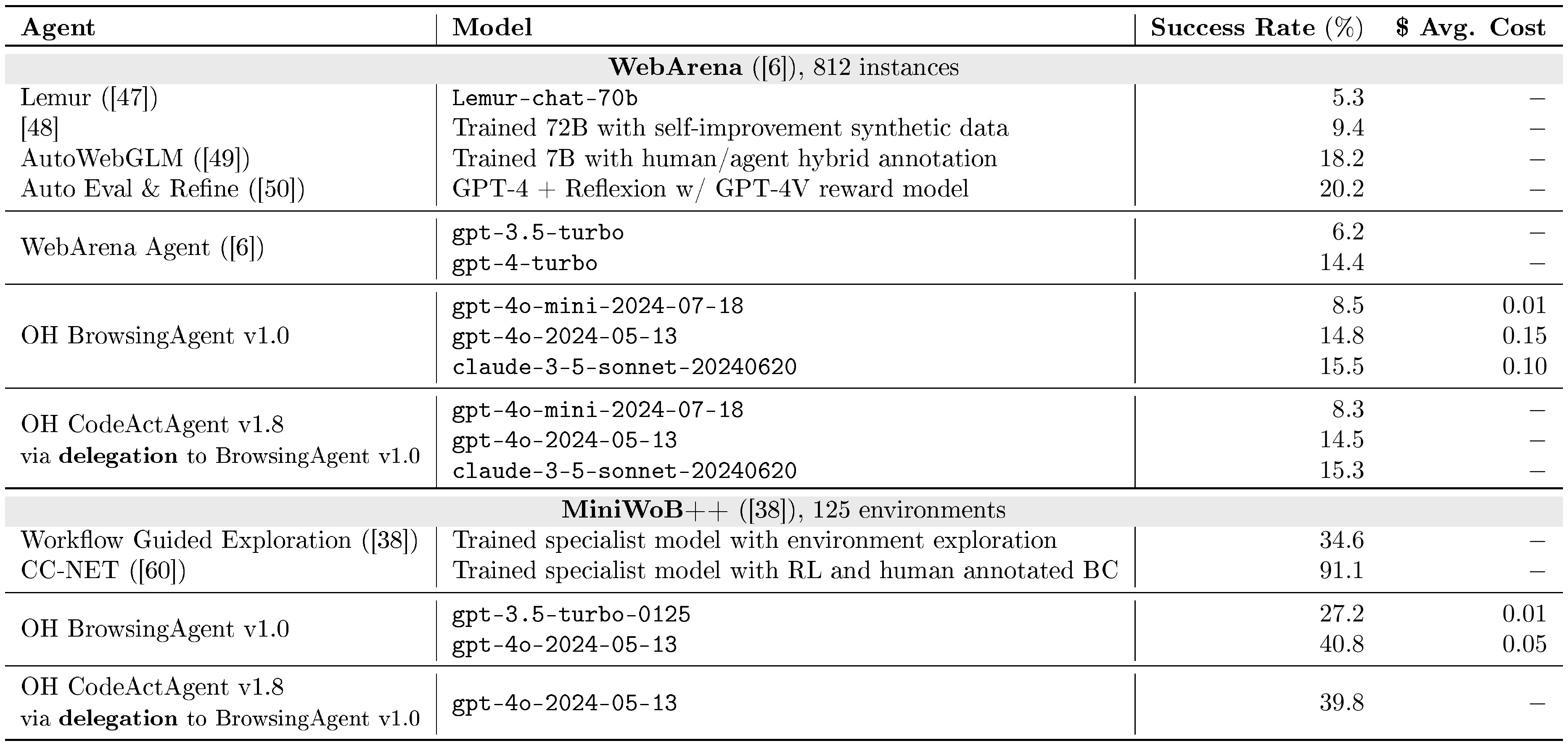
We report evaluation results for web browsing benchmarks in Table 5.
WebArena ([6]) is a self-hostable, execution-based web agent benchmark that allows agents to freely choose which path to take in completing their given tasks. WebArena comprises 812 human-curated task instructions across various domains, including shopping, forums, developer platforms, and content management systems.
Results. From Table 5, we can see that our BrowsingAgent achieves competitive performance among agents that use LLMs with domain-general prompting techniques.
MiniWoB++ ([38]) is an interactive web benchmark, with built-in reward functions. The tasks are synthetically initialized on 125 different minimalist web interfaces. Unlike WebArena, tasks are easier without page changes, require fewer steps, and provide low-level step-by-step task directions. Note that it contains a portion of environments that require vision capability to tackle successfully, and many existing work choose to focus only on a subset of the tasks ([57, 58, 59]). Still, we report the performance on the full set and only include baselines that are evaluated on the full set.
::: {caption="Table 5: OpenHands Web Browsing Evaluation Results (§ 4.3)."}
:::
4.4 Miscellaneous Assistance
Results for miscellaneous assistance benchmarks are reported in Table 6.
GAIA ([39]) evaluates agents' general task-solving skills, covering different real-world scenarios. It requires various agent capabilities, including reasoning, multi-modal understanding, web browsing, and coding. GAIA consists of 466 curated tasks across three levels. Setting up GAIA is traditionally challenging due to the complexity of integrating various tools with the agent, but OpenHands's infrastructure (e.g., runtime § 2.2, tools § 2.3) simplifies the integration significantly.
GPQA ([40]) evaluates agents' ability for coordinated tool use when solving challenging graduate-level problems. Tool use (e.g., python) and web search are often useful to assist agents in answering these questions since they provide accurate calculations that LLMs are often incapable of and access to information outside of the LLM's parametric knowledge base.
\begin{tabular}{l|l|rr}
\toprule
\textbf{Agent} & \textbf{Model} & \textbf{Success Rate} (\%) & \textbf{\$ Avg. Cost} \\
\toprule

\rowcolor[RGB]{234, 234, 234} \multicolumn{4}{c}{\textbf{GAIA} ([39]), L1 validation set, 53 instances} \\

\multirow{1}{*}{AutoGPT ([26])} & \texttt{gpt-4-turbo} & $13.2$ & $-$ \\
\midrule
\multirow{2}{*}{OH GPTSwarm v1.0}
& \texttt{gpt-4-0125-preview} & $30.2$ & $0.110$ \\
& \texttt{gpt-4o-2024-05-13} & $32.1$ & $0.050$ \\

\toprule
\rowcolor[RGB]{234, 234, 234} \multicolumn{4}{c}{\textbf{GPQA}
([40]), diamond set, 198 instances (refer to § G, Table 7 for other subsets)} \\

\multirow{2}{*}{Human ([40])}
& Expert human & $81.3$ & $-$ \\
& Non-expert human & $21.9$ & $-$ \\

\midrule

\multirow{2}{*}{Few-shot Prompting + Chain-of-Thought ([40])}
& \texttt{gpt-3.5-turbo-16k} & $29.6$ & $-$ \\
& \texttt{gpt-4} & $38.8$ & $-$ \\

\midrule
\multirow{1}{*}{OH CodeActAgent v1.8}
& \texttt{claude-3-5-sonnet-20240620} & $52.0$ & $0.065$ \\

\toprule
\rowcolor[RGB]{234, 234, 234} \multicolumn{4}{c}{\textbf{AgentBench} ([41]), OS (bash) subset, 144 instances} \\

\multirow{2}{*}{AgentBench Baseline Agent ([41])}
& \texttt{gpt-4} & $42.4$ & $-$ \\
& \texttt{gpt-3.5-turbo} & $32.6$ & $-$ \\
\midrule
\multirow{2}{*}{OH CodeActAgent v1.5}
& \texttt{gpt-4o-2024-05-13} & $57.6$ & $0.085$ \\
& \texttt{gpt-3.5-turbo-0125} & $11.8$ & $0.006$ \\

\toprule
\rowcolor[RGB]{234, 234, 234} \multicolumn{4}{c}{\textbf{MINT} ([42]): \texttt{math} subset, 225 instances} \\

\multirow{1}{*}{MINT Baseline Agent}
& \texttt{gpt-4-0613} & $65.8$ & $-$ \\

\midrule

\multirow{2}{*}{OH CodeActAgent v1.5}
& \texttt{gpt-4o-2024-05-13} & $77.3$ & $0.070$ \\
& \texttt{gpt-3.5-turbo-16k-0613} & $33.8$ & $0.048$ \\

\toprule
\rowcolor[RGB]{234, 234, 234} \multicolumn{4}{c}{\textbf{MINT} ([42]): \texttt{code} subset, 136 instances} \\

\multirow{1}{*}{MINT Baseline Agent}
& \texttt{gpt-4-0613} & $59.6$ & $-$ \\

\midrule

\multirow{2}{*}{OH CodeActAgent v1.5}
& \texttt{gpt-4o-2024-05-13} & $50.0$ & $0.087$ \\
& \texttt{gpt-3.5-turbo-16k-0613} & $5.2$ & $0.030$ \\

\toprule
\rowcolor[RGB]{234, 234, 234} \multicolumn{4}{c}{\textbf{ProofWriter} ([44]), 600 instances} \\
\multirow{1}{*}{Few-shot Prompting + Chain-of-Thought ([61])}
& \texttt{gpt4} & $68.1$ & $-$ \\
\midrule
\multirow{1}{*}{Logic-LM ([61])}
& \texttt{gpt4 + symbolic solver} & $79.6$ & $-$ \\
\midrule
\multirow{1}{*}{OH CodeActAgent v1.5}
& \texttt{gpt-4o-2024-05-13} & $78.8$ & $-$ \\

\toprule
\rowcolor[RGB]{234, 234, 234} \multicolumn{4}{c}{\textbf{Entity Deduction Arena} ([43]), 200 instances} \\
\multirow{2}{*}{Zero-shot Prompting ([43])}
& \texttt{gpt-4-0314} & $40.0$ & $-$ \\
& \texttt{gpt-3.5-turbo-0613} & $27.0$ & $-$ \\
\midrule
\multirow{2}{*}{OH CodeActAgent v1.5}
& \texttt{gpt-4o-2024-05-13} & $38.0$ & $-$ \\
& \texttt{gpt-3.5-turbo-16k-0613} & $24.0$ & $-$ \\

\bottomrule
\end{tabular}
AgentBench ([41]) evaluates agents' reasoning and decision-making abilities in a multi-turn, open-ended generation setting. We selected the code-grounded operating system (OS) subset with 144 tasks. Agents from OpenHands interact directly with the task-specific OS using bash commands in a multi-turn manner, combining interaction and reasoning to automate task completion.
MINT ([42]) is a benchmark designed to evaluate agents' ability to solve challenging tasks through multi-turn interactions using tools and natural language feedback simulated by GPT-4. We use coding and math subsets used in [62]. We follow the original paper and allow the agent to interact with up to five iterations with two chances to propose solutions.
ProofWriter ([44]) is a synthetic dataset created to assess deductive reasoning abilities of LLMs. Same as Logic-LM ([61]), we focus on the most challenging subset, which contains 600 instances requiring 5-hop reasoning. To minimize the impact of potential errors in semantic parsing, we use the logical forms provided by Logic-LM.
Entity Deduction Arena (EDA) ([43]) evaluates agents' ability to deduce unknown entities through strategic questioning, akin to the 20 Questions game. This benchmark tests the agent's state tracking, strategic planning, and inductive reasoning capabilities over multi-turn conversations. We evaluate two datasets "Things" and "Celebrities", each comprising 100 instances, and report the average success rate over these two datasets.
5. Conclusion
Section Summary: OpenHands is a community-driven platform that helps researchers and developers build AI agents capable of interacting with the real world through software. It supplies a secure testing space, ready-made agent skills, tools for multiple agents to work together, and ways to measure performance, all intended to speed up both research and practical uses of such systems. Although challenges remain in creating reliable and safe agents, the creators are optimistic about ongoing community contributions and the platform’s future growth.
We introduce OpenHands, a community-driven platform that enables the development of agents that interact with the world through software interfaces. By providing a powerful interaction mechanism, a safe sandboxed environment, essential agent skills, multi-agent collaboration capabilities, and a comprehensive evaluation framework, OpenHands accelerates research innovations and real-world applications of agentic AI systems. Despite challenges in developing safe and reliable agents (§ A), we are excited about our vibrant community and look forward to OpenHands's continued evolution.
Appendix
Section Summary: The appendix details the many contributors to this open-source project and the specific roles they played in developing agents, system architecture, benchmarks, and code reviews, with Xingyao Wang as the lead coordinator. It then outlines key limitations of the current work along with planned improvements in areas such as multi-modal support, agent capabilities, file editing, web browsing, and automatic workflow generation. The section closes by addressing ethical considerations around AI agent risks and the value of systematic evaluation and human oversight, followed by a brief overview of related advances in large language models and autonomous agents.
Author Contributions
This work was an open-source collaborative effort across multiple institutions. We employed a point-based system to determine contributions and award authorships, with technical contributions tracked and measured in units of pull requests (PRs)[^3]. Xingyao Wang led the project, coordinating overall development and paper writing efforts. Detailed contributions were as follows:
[^3]: For more details, please refer to https://github.com/All-Hands-AI/OpenHands/pull/1917.
Agent Development (§ 3): Xingyao Wang led the implementation of CodeAct [14] and CodeActSWE agents. Frank F. Xu led the development of web browsing agents [6]. Mingchen Zhuge orchestrated the integration of the GPTSwarm agent [30]. Robert Brennan and Boxuan Li lead the development of the Micro Agent.
Architectural Development (Figure 2): Robert Brennan initiated the architecture design. Boxuan Li, Frank F. Xu, Xingyao Wang, Yufan Song, and Mingzhang Zheng further refined and expanded the architecture. Boxuan Li implemented the initial version of integration tests (§ E), maintained the agentskills library (§ 2.3), managed configurations, and resolved resource leaks in evaluation. Frank F. Xu developed the web browsing environment (§ J) for both agent execution and evaluation and integrated it with both agent and front-end user interfaces. Xingyao Wang authored the initial code for the agentskills library and the Docker sandbox. Yufan Song implemented cost tracking for evaluation, while Mingzhang Zheng developed an image-agnostic docker sandbox for more stable SWE-Bench evaluation.
Benchmarking, Integration, and Code Review: Boxuan Li and Yufan Song led benchmark integration efforts, including coordination, evaluation, and code review. Yufan Song also helped track PR contributions. Graham Neubig, Xingyao Wang, Mingzhang Zheng, Robert Brennan, Hoang H. Tran, Frank F. Xu, Xiangru Tang, Fuqiang Li, and Yanjun Shao provided additional support in integration and code reviews.
Specific benchmark contributions included:
- SWE-Bench [5]: Bowen Li and Xingyao Wang
- WebArena [6] and MiniWob++ [38]: Frank F. Xu
- GAIA [39]: Jiayi Pan (integration) and Mingchen Zhuge (GPTSwarm evaluation)
- API-Bench [36] and ToolQA [37]: Yueqi Song
- HumanEvalFix [32]: Niklas Muennighoff and Xiangru Tang
- ProofWriter [44]: Ren Ma
- MINT [42]: Hoang H. Tran
- AgentBench [41]: Fuqiang Li
- BIRD [33]: Binyuan Hui
- GPQA [40]: Jaskirat Singh
- BioCoder [34]: Xiangru Tang and Bill Qian
- ML-Bench [35]: Xiangru Tang and Yanjun Shao
- Entity-Deduction-Arena [43]: Yizhe Zhang
Advising: Graham Neubig advised the project, providing guidance, resources, and substantial paper edits. Heng Ji and Hao Peng offered additional project advice and assisted with paper writing. Junyang Lin contributed advisory support and sponsored resources.
A. Limitations and Future Work
We are excited about the foundations our vibrant community has laid in OpenHands and look forward to its continued evolution. We identify several directions for future work:
Enhanced multi-modality support. While our current implementation already supports a wide range of file formats through predefined agent skills, we are interested in enabling multi-modality in a principled way through standard IPython and browser integration, such as viewing images and videos using vision-language model through a browser or processing XLSX files with code.
Stronger agents. Current agents still struggle with complex tasks, and we are interested in building better agents through both training and inference time techniques.
Agent editing improvements. Current agent suffers a lot when editing long files, and we are interested in exploring different approaches to improve the file editing performance of agents.
Web browsing improvements. Due to the extensible nature of OpenHands, orthogonal components that could improve agents can be integrated easily. For example, thanks to OpenHands's extensible architecture, Auto Eval & Refine [50], an agent retry-on-error strategy with Reflexion [63] prompts and task completion reward models, will be integrated as an optional component attached to our browsing agent.
Automatic workflow generation. Currently, OpenHands's workflow still requires a substantial handcrafted workload. We believe that graph-based frameworks such as GPTSwarm [30] and LangGraph [18] could serve as alternative solutions for building agents. Particularly in GPTSwarm, when agents are constructed using graphs, it becomes easier to incorporate various optimization methods (e.g., reinforcement learning, meta-prompting). OpenHands considers these methods to lay the groundwork for promising solutions in automatic workflow generation in future versions.
B. Ethics Statement
Most AI agents today are still research artifacts and lack the ability to perform complex, long-horizon tasks in the real world reliably. However, as their performance continues to improve and they are increasingly deployed in real world, they have the potential to boost productivity while also posing security risks to society significantly. OpenHands helps mitigate risks by:
- (1) Enabling systematic evaluation of these agents, which can identify and address risks before they are widely deployed.
- (2) Facilitating human-agent interaction rather than allowing agents to operate autonomously without oversight.
- (3) More importantly, we hope OpenHands allows researchers worldwide to access the best suites of agents to conduct frontier safety research towards building safe and helpful agents.
C. Related Work
The breakthroughs in large language models (LLMs) like ChatGPT [53] and GPT-4 [64] have significantly enhanced the capabilities of autonomous agents across various domains [65, 66, 67, 68]. These advances have spurred a multitude of generalist agent proposals [26, 69, 12] aimed at performing diverse user tasks and have gained attention from both developers and broader audiences. Notable works such as Auto-GPT [26] harness LLMs for task completion by decomposing user goals into executable steps. Multi-agent collaboration systems leverage LLMs for elements like role-playing and task-solving capabilities [70, 71, 27, 28], with MetaGPT [10] emphasizing standardized operating procedures, and AutoGen [12] providing a conversation framework for interactive systems. AGENTS [27] and AutoAgents [11] offer new paradigms for customizable agent architecture, while XAgent [28] and GPTSwarm [30] introduce complex management systems and optimizable graphs, respectively, for enhanced agent operations.
This surge in agent development has led to specialized frameworks aimed at streamlining agent implementation. LangChain and LangGraph [18] provide foundational building blocks with basic runtime support, while CrewAI [72] focuses on orchestrating multi-agent communications. BrowserGym [15] specifically targets web browsing capabilities, and DSPy [73] emphasizes end-to-end prompt optimization. AutoGen [12] advances beyond basic frameworks by implementing Python and bash execution capabilities, though with stateless command execution, while frameworks like CrewAI offer sandboxed but limited code interpreter features.
Software development, a front-runner in applying LLM-based agents, has seen advancements in frameworks for facilitating the development processes [10, 74]. Innovations such as ChatDev [74] automate the software development lifecycle akin to the waterfall model, and AutoCodeRover [31] addresses GitHub issues via code search and abstract syntax tree manipulation. AgentCoder [75] iteratively refines code generation with integrated testing and feedback, while SWE-Agent [16] integrates LLMs for automated Github issue fixing, streamlining software engineering.
D. Graphical User Interface
Besides running from the command line, OpenHands features a rich graphical user interface that visualizes the agent's current actions (e.g., browsing the web, executing base commands or Python code, etc.) and allows for real-time feedback from the user. Screenshots of the UI are shown in Figure 1. The user may interrupt the agent at any moment to provide additional feedback, comments, or instruction while the agent is working. This user interface directly connects with the event streams (§ 2.1) to control and visualize the agents and runtime, making it agent and runtime agnostic.
E. Quality Control: Integration Tests for Agents
Integration tests [76] have long been used by software developers to ensure software quality. Unlike large language models with simple input-output schema, agents are typically complex pieces of software where minor errors can be easily introduced during the development process and hurt final task performance. While running a full suite evaluation (§ 4) is the ultimate measure of performance degradation, running them for every code changes can be prohibitively slow and expensive. [^4]. In OpenHands, we pioneer an end-to-end agent test framework that tests prompt regression, actions, and sandbox environments. It combines integration testing from software engineering and foundation model mocking for deterministic behavior to prevent the accidental introduction of bugs during agent development.
[^4]: Running a SWE-Bench Lite [5] evaluation with gpt-4o costs around 600 USD.
Defining an integration test. The integration test framework for OpenHands is structured to validate end-to-end functionality by automating task execution and result verification. Developers define tasks and expected results; for instance, a task might involve correcting typos in a document named "bad.txt". Upon task execution through OpenHands, outputs are compared against a predefined "gold file" to ensure accuracy.
Mocking LLM for deterministic behavior. Addressing the challenge of non-determinism in large language models (LLMs) and the associated high costs, the framework intercepts all LLM calls and supplies predefined responses based on exact prompt matches. This method not only ensures consistency in test outcomes but also reduces operational costs by minimizing the reliance on real LLMs.
Regenerate LLM responses on breaking changes. Prompt-response pairs are managed through a script that generates and stores these pairs when new tests are introduced or existing prompts are modified. For routine tests, the framework attempts to reuse existing LLM responses by slightly adjusting the prompts. Substantial changes that affect task handling require regeneration of these pairs using real LLMs.
Benefits of integration tests. The framework offers several advantages, including 1) Prompt regression testing: Stored prompt-response pairs facilitate change tracking and provide a reference for new team members to understand LLM interactions, 2) Multi-platform support: Tests are automatically scheduled for every pull request and commit on the main branch, running across multiple platforms, environments, and agents, including Linux and Mac, and in local, SSH, and exec sandboxes, and 3) Comprehensive error detection: It captures errors in prompt generation, message passing, and sandbox execution, thereby maintaining a high test coverage.
F. How OpenHands Runtime work
F.1 Workflow
The OpenHands Runtime system uses a client-server architecture implemented with Docker containers. See Figure 4 for an overview of how it works.
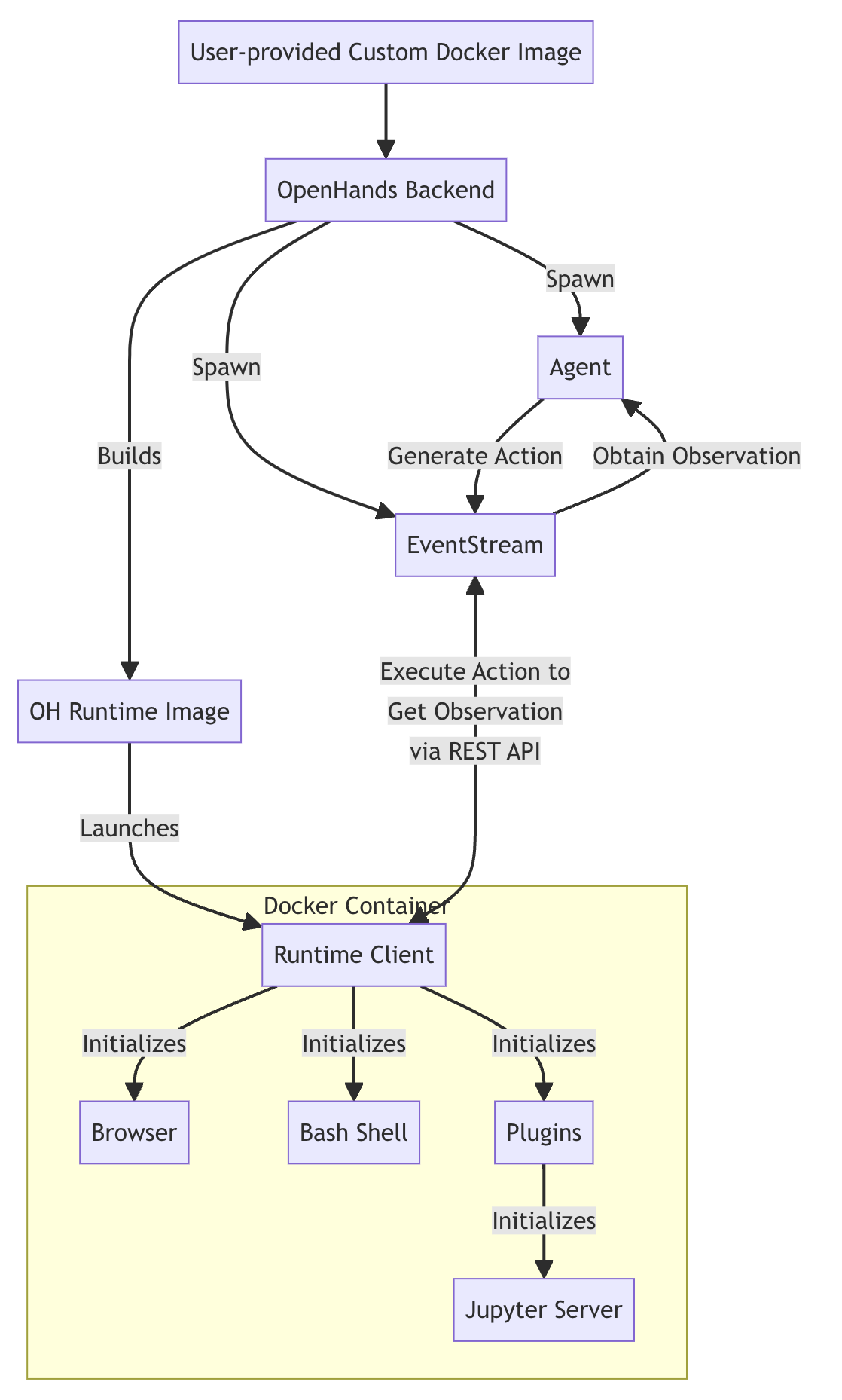
- (1) User Input: The user provides a custom base Docker image.
- (2) Image Building: OpenHands builds a new Docker image (the "OH runtime image") based on the user-provided image. This new image includes OpenHands-specific code, primarily the "runtime client" (i.e., runtime API server described in § 2.2).
- (3) Container Launch: When OpenHands starts, it launches a Docker container using the OH runtime image.
- (4) Communication: The OpenHands backend (
runtime.py) communicates with the runtime client over RESTful API, sending actions and receiving observations - (5) Action Execution: The runtime client receives actions from the backend, executes them in the sandboxed environment, and sends back observations
- (6) Observation Return: The client sends execution results back to the OpenHands backend event stream as observations.
The role of the client:
- It acts as an intermediary between the OpenHands backend and the sandboxed environment
- It executes various types of actions (shell commands, file operations, Python code, etc.) safely within the container
- It manages the state of the sandboxed environment, including the current working directory and loaded plugins
- It formats and returns observations to the backend, ensuring a consistent interface for processing results
F.2 How OpenHands builds and maintains runtime images
OpenHands' approach to building and managing runtime images ensures efficiency, consistency, and flexibility in creating and maintaining Docker images for both production and development environments.
F.2.1 Image Tagging System
OpenHands uses a dual-tagging system for its runtime images to balance reproducibility with flexibility:
(1) Hash-based tag:
{target_image_repo}:{target_image_hash_tag}.Example:
runtime:abc123def456- This tag is based on the MD5 hash of the Docker build folder, which includes the source code (of runtime client and related dependencies) and Dockerfile
- Identical hash tags guarantee that the images were built with exactly the same source code and Dockerfile
- This ensures reproducibility; the same hash always means the same image contents
(2) Generic tag:
{target_image_repo}:{target_image_tag}.Example:
runtime:oh_v0.9.3_ubuntu_tag_22.04- This tag follows the format:
runtime:oh_v{VERSION}_{BASE_IMAGE}_tag_{IMAGE_TAG} - It represents the latest build for a particular base image and OpenHands version combination
- This tag is updated whenever a new image is built from the same base image, even if the source code changes
- This tag follows the format:
The hash-based tag ensures reproducibility, while the generic tag provides a stable reference to the latest version of a particular configuration. This dual-tagging approach allows OpenHands to efficiently manage both development and production environments.
F.2.2 Build Process
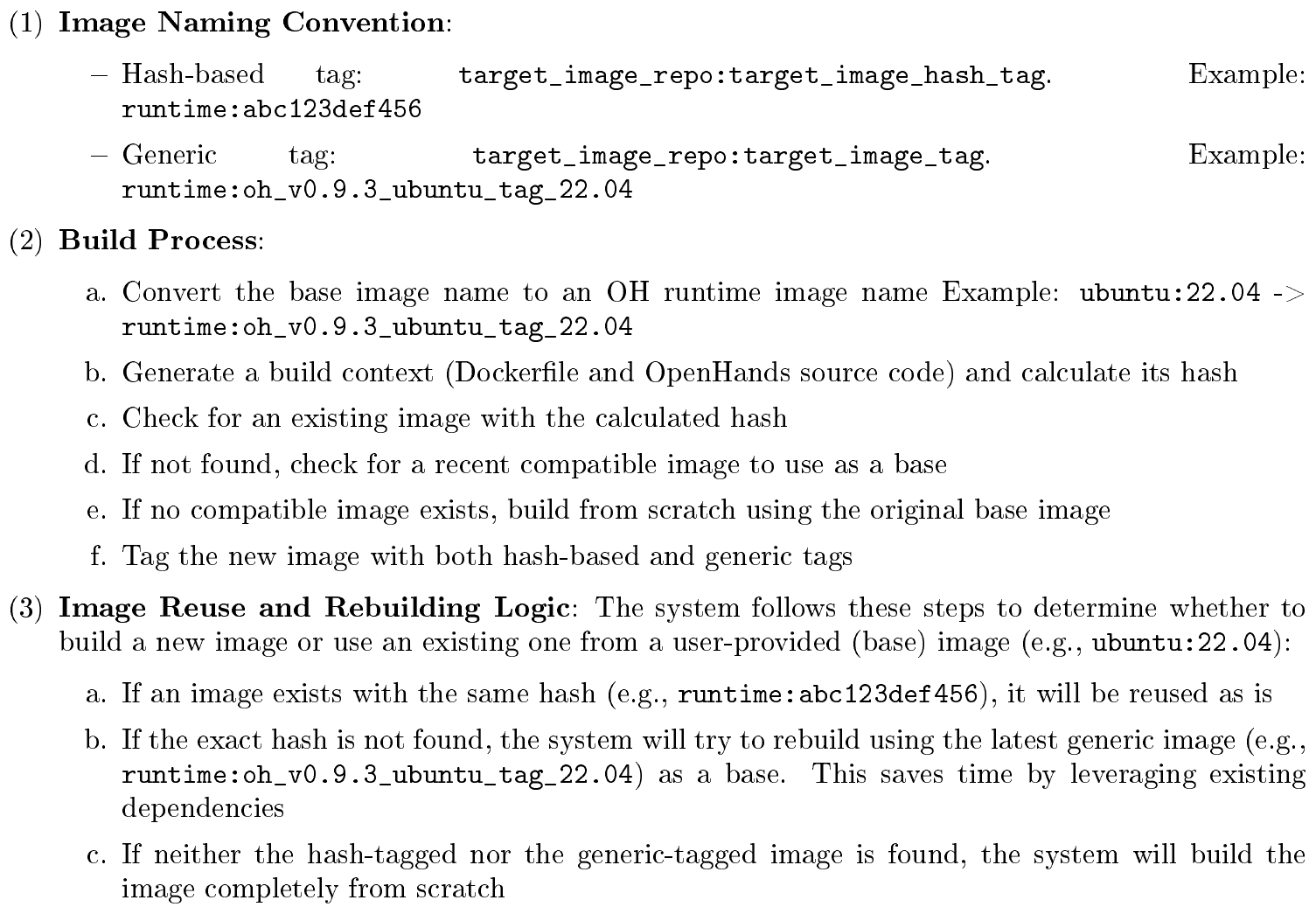
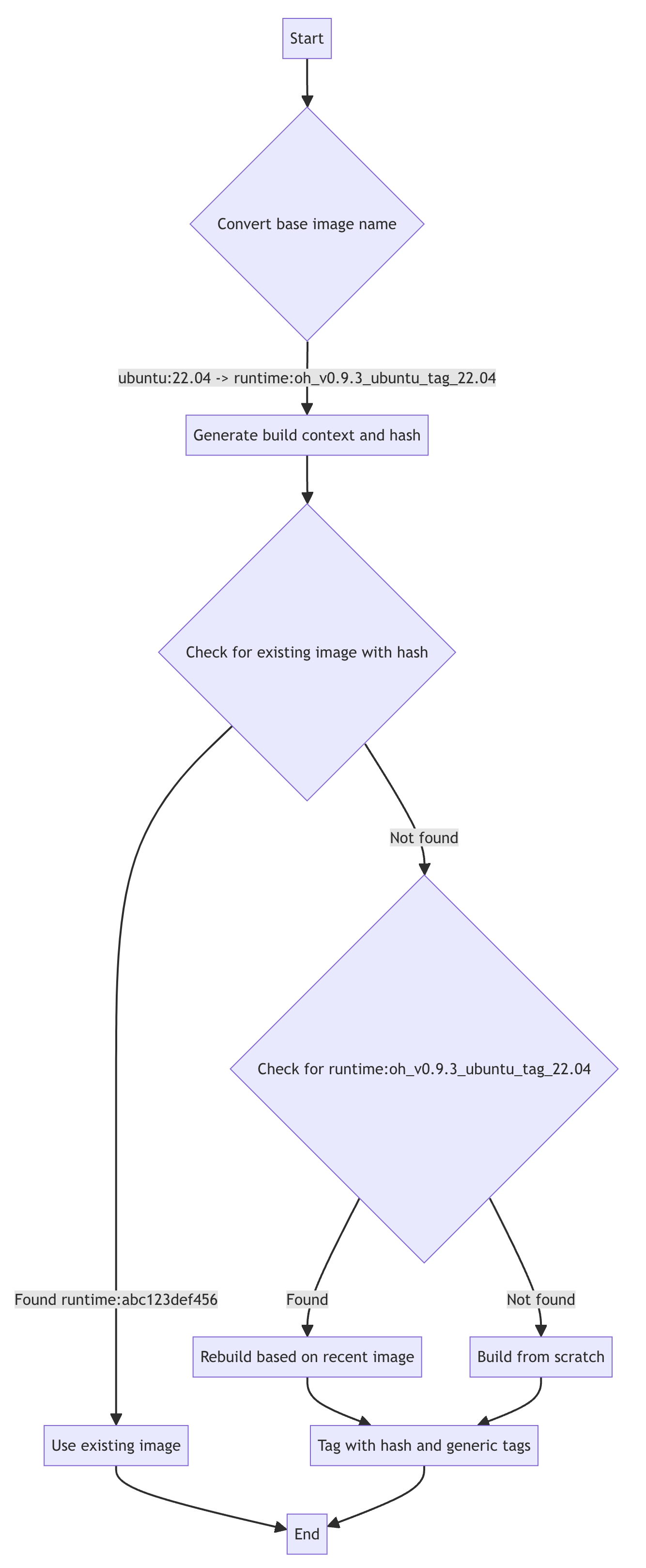
Caching and Efficiency. The system attempts to reuse existing images when possible to save build time. If an exact match (by hash) is found, it's used without rebuilding. If a compatible image is found, it's used as a base for rebuilding, saving time on dependency installation.
A flowchart illustrating the build process is shown in Figure 5
G. Additional Results For GPQA Benchmark
We showcase more detailed results, including performance on other subsets for GPQA benchmark in Table 7.
\begin{tabular}{lcccc}
  \toprule
  \multirow{2}{*}{\textbf{Evaluation Method and Model}} & \multicolumn{3}{c}{\textbf{Accuracy by subset (\%)}} & \multirow{2}{*}{\textbf{Avg Cost (\$)}} \\

  & {\emph{Diamond Set}} & {\emph{Main Set}} & {\emph{Extended Set}} & \\
  \midrule
  \rowcolor{Gray} Expert Human Validators & 81.2 & 72.5 & 65.4 & N/A \\
  \rowcolor{Gray} Non-Expert Human Validators & 21.9 & 30.5 & 33.9 & N/A \\
  \midrule
  Few-Shot CoT Llama-2-70B-chat & 28.1 & 29.1 & 30.4 & \cellcolor{Gray}N/A \\
  Few-Shot CoT GPT-3.5-turbo-16k & 29.6 & 28.0 & 28.2 & \cellcolor{Gray}N/A \\
  Few-Shot CoT GPT-4 & 38.8 & 39.7 & 38.7 & \cellcolor{Gray}N/A \\
  GPT-4 with search (backoff to CoT on abstention) & 38.8 & 41.0 & 39.4 & \cellcolor{Gray}N/A \\
  \midrule
  OpenHands + CodeActAgent v1.5 + GPT3.5-turbo & 27.9 & 23.4 & 26.1 & 0.012 \\
  OpenHands + CodeActAgent v1.5 + GPT4-turbo & 51.8 & 47.4 & 42.4 & 0.501 \\
  OpenHands + CodeActAgent v1.5 + GPT4o & \textbf{53.1} & \textbf{49.3} & \textbf{52.8} & 0.054 \\
  \bottomrule
  \end{tabular}
H. In-context Demonstration for CodeActSWEAgent
The prompt is re-adopted from the SWE-agent's released trajectory (https://github.com/princeton-nlp/SWE-agent/tree/main/trajectories/demonstrations). The prompt can be found at https://github.com/All-Hands-AI/OpenHands/blob/main/agenthub/codeact_swe_agent/prompt.py.
I. Supported AgentSkills
As of OpenHands v0.6, we support the following list of skills. Please refer to the source code for the most up-to-date list of skills: https://github.com/All-Hands-AI/OpenHands/blob/main/OpenHands/runtime/plugins/agent_skills/agentskills.py
def open_file(path: str, line_number: Optional[int] = None) -> None:
    """
    Opens the file at the given path in the editor. If line_number is provided, the window will be moved to include that line.

    Args:
        path: str: The path to the file to open.
        line_number: Optional[int]: The line number to move to.
    """
    pass

def goto_line(line_number: int) -> None:
    """
    Moves the window to show the specified line number.

    Args:
        line_number: int: The line number to move to.
    """
    pass

def scroll_down() -> None:
    """Moves the window down by 100 lines.

    Args:
        None
    """
    pass

def scroll_up() -> None:
    """Moves the window up by 100 lines.

    Args:
        None
    """
    pass

def create_file(filename: str) -> None:
    """Creates and opens a new file with the given name.

    Args:
        filename: str: The name of the file to create.
    """
    pass

def edit_file(start: int, end: int, content: str) -> None:
    """Edit a file.

    It replaces lines `start` through `end` (inclusive) with the given text `content` in the open file. Remember, the file must be open before editing.

    Args:
        start: int: The start line number. Must satisfy start >= 1.
        end: int: The end line number. Must satisfy start <= end <= number of lines in the file.
        content: str: The content to replace the lines with.
    """
    pass

def search_dir(search_term: str, dir_path: str = './') -> None:
    """Searches for search_term in all files in dir. If dir is not provided, searches in the current directory.

    Args:
        search_term: str: The term to search for.
        dir_path: Optional[str]: The path to the directory to search.
    """
    pass

def search_file(search_term: str, file_path: Optional[str] = None) -> None:
    """Searches for search_term in file. If file is not provided, searches in the current open file.

    Args:
        search_term: str: The term to search for.
        file_path: Optional[str]: The path to the file to search.
    """
    pass

def find_file(file_name: str, dir_path: str = './') -> None:
    """Finds all files with the given name in the specified directory.

    Args:
        file_name: str: The name of the file to find.
        dir_path: Optional[str]: The path to the directory to search.
    """
    pass

def parse_pdf(file_path: str) -> None:
    """Parses the content of a PDF file and prints it.

    Args:
        file_path: str: The path to the file to open.
    """
    pass

def parse_docx(file_path: str) -> None:
    """
    Parses the content of a DOCX file and prints it.

    Args:
        file_path: str: The path to the file to open.
    """
    pass

def parse_latex(file_path: str) -> None:
    """
    Parses the content of a LaTex file and prints it.

    Args:
        file_path: str: The path to the file to open.
    """
    pass

def parse_audio(file_path: str, model: str = 'whisper-1') -> None:
    """
    Parses the content of an audio file and prints it.

    Args:
        file_path: str: The path to the audio file to transcribe.
        model: Optional[str]: The audio model to use for transcription. Defaults to 'whisper-1'.
    """
    pass

def parse_image(
    file_path: str, task: str = 'Describe this image as detail as possible.'
) -> None:
    """
    Parses the content of an image file and prints the description.

    Args:
        file_path: str: The path to the file to open.
        task: Optional[str]: The task description for the API call. Defaults to 'Describe this image as detail as possible.'.
    """
    pass

def parse_video(
    file_path: str,
    task: str = 'Describe this image as detail as possible.',
    frame_interval: int = 30,
) -> None:
    """
    Parses the content of an image file and prints the description.

    Args:
        file_path: str: The path to the video file to open.
        task: Optional[str]: The task description for the API call. Defaults to 'Describe this image as detail as possible.'.
        frame_interval: Optional[int]: The interval between frames to analyze. Defaults to 30.

    """
    pass

def parse_pptx(file_path: str) -> None:
    """
    Parses the content of a pptx file and prints it.

    Args:
        file_path: str: The path to the file to open.
    """
    pass
J. BrowserGym Actions
The following are all the supported actions defined in BrowserGym^5 as of v0.3.4. The actions can be categorized into several types and can be configured to use only a subset of the functionality. There are agent control actions, navigation actions, page element-based actions, coordinate-based actions, as well as tab-related actions. We use these actions from the BrowserGym library as our main browsing action primitives.
def send_msg_to_user(text: str):
    """
    Sends a message to the user.

    Examples:
        send_msg_to_user("Based on the results of my search, the city was built in 1751.")
    """
    pass

def report_infeasible(reason: str):
    """
    Notifies the user that their instructions are infeasible.

    Examples:
        report_infeasible("I cannot follow these instructions because there is no email field in this form.")
    """
    pass

def noop(wait_ms: float = 1000):
    """
    Do nothing, and optionally wait for the given time (in milliseconds).

    Examples:
        noop()
        noop(500)
    """
    pass

## https://playwright.dev/docs/input#text-input

> **Section Summary**: The fill function lets you enter text into online forms by targeting a specific field with an identifier and providing the desired value, which automatically focuses the area and inserts the content as if typed by a user. It supports common form elements like single-line boxes, multi-line text areas, and editable sections, while correctly handling line breaks, quotes, and other special characters without extra steps. This makes it a straightforward way to fill out inputs during automated web interactions.

def fill(bid: str, value: str):
    """
    Fill out a form field. It focuses the element and triggers an input event with the entered text.
    It works for <input>, <textarea> and [contenteditable] elements.

    Examples:
        fill('23 $7'$, 'example value')
        fill('4 $5'$, "multi-line\\nexample")
        fill('a1 $2'$, "example with \\"quotes\\"")
    """
    pass

## https://playwright.dev/python/docs/api/class-locator#locator-check
def check(bid: str):
    """
    Ensure a checkbox or radio element is checked.

    Examples:
        check('5 $5')$
    """
    pass

## https://playwright.dev/python/docs/api/class-locator#locator-uncheck
def uncheck(bid: str):
    """
    Ensure a checkbox or radio element is unchecked.

    Examples:
        uncheck('a528 $9')$
    """
    pass

## https://playwright.dev/docs/input#select-options

> **Section Summary**: This section explains how to pick one or more choices from a dropdown menu on a web page using a simple function. You identify the menu by a short code label and then supply either a single value or label, or a list of several, to select what you want. The examples show selecting a single color like "blue" or multiple colors at the same time.

def select_option(bid: str, options: str | list[str]):
    """
    Select one or multiple options in a <select> element. You can specify
    option value or label to select. Multiple options can be selected.

    Examples:
        select_option('a4 $8'$, "blue")
        select_option('c4 $8', [$ "red", "green", "blue"])
    """
    pass

## https://playwright.dev/python/docs/api/class-locator#locator-click

> **Section Summary**: The click function simulates a mouse click on a webpage element identified by a specific ID or selector. It supports choosing the mouse button, such as left for a standard click, right for context menus, or middle for specialized actions, along with optional keyboard keys like Shift or Control held at the same time. This provides a straightforward way to replicate common user interactions during automated browser tasks.

def click(
    bid: str,
    button: Literal["left", "middle", "right"] = "left",
    modifiers: list[Literal["Alt", "Control", "Meta", "Shift"]] = [],
):
    """
    Click an element.

    Examples:
        click('a5 $1')$
        click('b2 $2'$, button="right")
        click('4 $8'$, button="middle", modifiers=["Shift"])
    """
    pass

## https://playwright.dev/python/docs/api/class-locator#locator-dblclick

> **Section Summary**: The dblclick function lets you simulate a double-click action on a specific element within a web page or application interface. You can specify which mouse button to use, such as the left, middle, or right button, and optionally include keyboard modifiers like Shift or Control to mimic more complex user interactions. This capability supports automated testing or scripted navigation by replicating real-world mouse behaviors in a straightforward way.

def dblclick(
    bid: str,
    button: Literal["left", "middle", "right"] = "left",
    modifiers: list[Literal["Alt", "Control", "Meta", "Shift"]] = [],
):
    """
    Double click an element.

    Examples:
        dblclick('1 $2')$
        dblclick('ca4 $2'$, button="right")
        dblclick('17 $8'$, button="middle", modifiers=["Shift"])
    """
    pass

## https://playwright.dev/python/docs/api/class-locator#locator-hover
def hover(bid: str):
    """
    Hover over an element.

    Examples:
        hover('b8')
    """
    pass

## https://playwright.dev/python/docs/input#keys-and-shortcuts

> **Section Summary**: The provided function focuses on a specific webpage element and then simulates pressing a key or key combination on it, much like typing on a physical keyboard. It recognizes both special keys such as arrows, Enter, Backspace, and function keys, as well as ordinary characters, and it supports modifier combinations like Control or Shift held together with another key. This makes it possible to trigger shortcuts or text-entry actions directly in automated browser tests.

def press(bid: str, key_comb: str):
    """
    Focus the matching element and press a combination of keys. It accepts
    the logical key names that are emitted in the keyboardEvent.key property
    of the keyboard events: Backquote, Minus, Equal, Backslash, Backspace,
    Tab, Delete, Escape, ArrowDown, End, Enter, Home, Insert, PageDown, PageUp,
    ArrowRight, ArrowUp, F1 - F12, Digit0 - Digit9, KeyA - KeyZ, etc. You can
    alternatively specify a single character you'd like to produce such as "a"
    or "#". Following modification shortcuts are also supported: Shift, Control,
    Alt, Meta.

    Examples:
        press('8 $8'$, 'Backspace')
        press('a2 $6'$, 'Control+ $a')$
        press('a6 $1'$, 'Meta+Shift+ $t')$
    """
    pass

## https://playwright.dev/python/docs/api/class-locator#locator-focus
def focus(bid: str):
    """
    Focus the matching element.

    Examples:
        focus('b45 $5')$
    """
    pass

## https://playwright.dev/python/docs/api/class-locator#locator-clear
def clear(bid: str):
    """
    Clear the input field.

    Examples:
        clear('99 $6')$
    """
    pass

## https://playwright.dev/python/docs/input#drag-and-drop

> **Section Summary**: This function enables automated drag-and-drop actions on a webpage by first hovering over a chosen starting element, pressing and holding the left mouse button, then moving the cursor to a target element before releasing the button. It takes two identifiers to specify the source and destination items, allowing the process to occur without manual intervention. The approach mimics natural mouse movements to perform tasks like rearranging interface components or moving files within an application.

def drag_and_drop(from_bid: str, to_bid: str):
    """
    Perform a drag & drop. Hover the element that will be dragged. Press
    left mouse button. Move mouse to the element that will receive the
    drop. Release left mouse button.

    Examples:
        drag_and_drop('5 $6'$, '49 $8')$
    """
    pass

## https://playwright.dev/python/docs/api/class-mouse#mouse-wheel

> **Section Summary**: The scroll function simulates moving a mouse wheel to shift content horizontally and vertically on the screen. You provide pixel amounts for each direction, where positive values scroll right or down and negative values scroll left or up. The method then triggers a wheel event to make the scrolling take effect.

def scroll(delta_x: float, delta_y: float):
    """
    Scroll horizontally and vertically. Amounts in pixels, positive for right or down scrolling, negative for left or up scrolling. Dispatches a wheel event.

    Examples:
        scroll(0, 200)
        scroll(-50.2, -100.5)
    """
    pass

## https://playwright.dev/python/docs/api/class-mouse#mouse-move

> **Section Summary**: This function moves the mouse pointer to a chosen spot on the screen or web page by accepting two numbers that represent the exact horizontal and vertical position in pixels. These coordinates are measured from the top-left corner of the visible area, allowing precise placement rather than moving the mouse in small steps. Calling the function also triggers a standard mouse-movement notification so that the page can respond as it would to a real user action.

def mouse_move(x: float, y: float):
    """
    Move the mouse to a location. Uses absolute client coordinates in pixels.
    Dispatches a mousemove event.

    Examples:
        mouse_move(65.2, 158.5)
    """
    pass

## https://playwright.dev/python/docs/api/class-mouse#mouse-up

> **Section Summary**: The mouse_up function moves the cursor to a chosen spot on the screen using x and y coordinates and then releases a mouse button there. By default it lets go of the left button, but you can also choose the middle or right one if needed. This action triggers the usual events that happen when someone moves the mouse and releases a button, making it handy for basic screen interaction tasks.

def mouse_up(x: float, y: float, button: Literal["left", "middle", "right"] = "left"):
    """
    Move the mouse to a location then release a mouse button. Dispatches
    mousemove and mouseup events.

    Examples:
        mouse_up(250, 120)
        mouse_up(47, 252, 'right')
    """
    pass

## https://playwright.dev/python/docs/api/class-mouse#mouse-down

> **Section Summary**: The mouse_down function simulates moving the cursor to a precise spot on the screen and then pressing and holding down a mouse button there. You specify the exact x and y coordinates for the location, along with an optional choice of which button to use, such as left, middle, or right. This action sends out the usual events that a real mouse press would trigger during automated browser testing.

def mouse_down(x: float, y: float, button: Literal["left", "middle", "right"] = "left"):
    """
    Move the mouse to a location then press and hold a mouse button. Dispatches
    mousemove and mousedown events.

    Examples:
        mouse_down(140.2, 580.1)
        mouse_down(458, 254.5, 'middle')
    """
    pass

## https://playwright.dev/python/docs/api/class-mouse#mouse-click

> **Section Summary**: This function moves the mouse pointer to a chosen spot on the screen, defined by x and y coordinates, and then presses and releases a mouse button. By default it uses the left button, but you can select the middle or right button instead. It mimics the full set of actions that happen during a real click by sending the appropriate movement and button signals in sequence.

def mouse_click(x: float, y: float, button: Literal["left", "middle", "right"] = "left"):
    """
    Move the mouse to a location and click a mouse button. Dispatches mousemove,
    mousedown and mouseup events.

    Examples:
        mouse_click(887.2, 68)
        mouse_click(56, 712.56, 'right')
    """
    pass

## https://playwright.dev/python/docs/api/class-mouse#mouse-dblclick

> **Section Summary**: This section describes functions for simulating mouse actions in Playwright's Python library. The mouse_dblclick method moves the cursor to given screen coordinates and performs a double-click with any mouse button, sending the necessary movement and click events to the page. A related drag-and-drop function shifts the mouse from one set of coordinates to another in a similar way.

def mouse_dblclick(x: float, y: float, button: Literal["left", "middle", "right"] = "left"):
    """
    Move the mouse to a location and double click a mouse button. Dispatches
    mousemove, mousedown and mouseup events.

    Examples:
        mouse_dblclick(5, 236)
        mouse_dblclick(87.5, 354, 'right')
    """
    pass

def mouse_drag_and_drop(from_x: float, from_y: float, to_x: float, to_y: float):
    """
    Drag and drop from a location to a location. Uses absolute client
    coordinates in pixels. Dispatches mousemove, mousedown and mouseup
    events.

    Examples:
        mouse_drag_and_drop(10.7, 325, 235.6, 24.54)
    """
    pass

## https://playwright.dev/python/docs/api/class-keyboard#keyboard-press

> **Section Summary**: This function simulates pressing one or more keys on a virtual keyboard, accepting either special key names such as Backspace, Enter, or ArrowDown, or ordinary characters like letters and symbols. It also supports modifier combinations like Control, Shift, Alt, or Meta so that shortcuts can be triggered in a single call. The method is used mainly in browser automation scripts to interact with web pages exactly as a person would using the keyboard.

def keyboard_press(key: str):
    """
    Press a combination of keys. Accepts the logical key names that are
    emitted in the keyboardEvent.key property of the keyboard events:
    Backquote, Minus, Equal, Backslash, Backspace, Tab, Delete, Escape,
    ArrowDown, End, Enter, Home, Insert, PageDown, PageUp, ArrowRight,
    ArrowUp, F1 - F12, Digit0 - Digit9, KeyA - KeyZ, etc. You can
    alternatively specify a single character you'd like to produce such
    as "a" or "#". Following modification shortcuts are also supported:
    Shift, Control, Alt, Meta.

    Examples:
        keyboard_press('Backspace')
        keyboard_press('Control+ $a')$
        keyboard_press('Meta+Shift+ $t')$
        page.keyboard.press("PageDown")
    """
    pass

## https://playwright.dev/python/docs/api/class-keyboard#keyboard-up

> **Section Summary**: The keyboard_up function is used to simulate releasing a key that has been held down during automated browser testing, which sends the appropriate signal to the webpage that the key is no longer pressed. It accepts familiar key names such as Shift, Enter, Arrow keys, or function keys like F1, and it can also work with individual characters like letters or symbols. This helps recreate natural keyboard behavior in scripts so that web applications respond as they would to a real user lifting their finger off a key.

def keyboard_up(key: str):
    """
    Release a keyboard key. Dispatches a keyup event. Accepts the logical
    key names that are emitted in the keyboardEvent.key property of the
    keyboard events: Backquote, Minus, Equal, Backslash, Backspace, Tab,
    Delete, Escape, ArrowDown, End, Enter, Home, Insert, PageDown, PageUp,
    ArrowRight, ArrowUp, F1 - F12, Digit0 - Digit9, KeyA - KeyZ, etc.
    You can alternatively specify a single character you'd like to produce
    such as "a" or "#".

    Examples:
        keyboard_up('Shift')
        keyboard_up(' $c')$
    """
    pass

## https://playwright.dev/python/docs/api/class-keyboard#keyboard-down

> **Section Summary**: The keyboard_down function lets you press and hold a key as part of browser automation, sending a keydown event that the webpage can respond to. You supply either a standard key name such as Shift, Enter, ArrowDown, or F1 through F12, or simply a single character like a or #. This simulates a person keeping the key pressed until a matching release command is issued.

def keyboard_down(key: str):
    """
    Press and holds a keyboard key. Dispatches a keydown event. Accepts the
    logical key names that are emitted in the keyboardEvent.key property of
    the keyboard events: Backquote, Minus, Equal, Backslash, Backspace, Tab,
    Delete, Escape, ArrowDown, End, Enter, Home, Insert, PageDown, PageUp,
    ArrowRight, ArrowUp, F1 - F12, Digit0 - Digit9, KeyA - KeyZ, etc. You can
    alternatively specify a single character such as "a" or "#".

    Examples:
        keyboard_up('Shift')
        keyboard_up(' $c')$
    """
    pass

## https://playwright.dev/python/docs/api/class-keyboard#keyboard-type

> **Section Summary**: This function simulates typing out a provided string of text by triggering the full sequence of keydown, keypress, and keyup events for each individual character. It works independently of any modifier keys the user might be holding, so pressing Shift at the same time will not produce capital letters or altered characters. In short, the method simply reproduces the literal characters as given in the input string.

def keyboard_type(text: str):
    """
    Types a string of text through the keyboard. Sends a keydown, keypress/input,
    and keyup event for each character in the text. Modifier keys DO NOT affect
    keyboard_type. Holding down Shift will not type the text in upper case.

    Examples:
        keyboard_type('Hello world!')
    """
    pass

## https://playwright.dev/python/docs/api/class-keyboard#keyboard-insert-text

> **Section Summary**: The keyboard_insert_text function lets you add a string of text straight into whatever element is currently active and ready for input on the page. It works by sending just a simple input signal, without triggering the individual key-press events that normally happen when someone types on a keyboard. Modifier keys such as Shift are ignored as well, so the text appears exactly as you provide it with no changes in capitalization or other special effects.

def keyboard_insert_text(text: str):
    """
    Insert a string of text in the currently focused element. Dispatches only input
    event, does not emit the keydown, keyup or keypress events. Modifier keys DO NOT
    affect keyboard_insert_text. Holding down Shift will not type the text in upper
    case.

    Examples:
        keyboard_insert_text('Hello world!')
    """
    pass

## https://playwright.dev/python/docs/api/class-page#page-goto
def goto(url: str):
    """
    Navigate to a url.

    Examples:
        goto('http://www.example.com')
    """
    pass

## https://playwright.dev/python/docs/api/class-page#page-go-back
def go_back():
    """
    Navigate to the previous page in history.

    Examples:
        go_back()
    """
    pass

## https://playwright.dev/python/docs/api/class-page#page-go-forward
def go_forward():
    """
    Navigate to the next page in history.

    Examples:
        go_forward()
    """
    pass

## https://playwright.dev/python/docs/api/class-browsercontext#browser-context-new-page

> **Section Summary**: The provided code defines a straightforward function to open a new browser tab using Playwright's automation tools. It creates a fresh page through the existing browser context, assigns it as the active page for ongoing work, and includes a note about notifying another system called browsergym of the change. In practice, calling this function lets automated scripts switch focus to a new tab without manually managing browser details.

def new_tab():
    """
    Open a new tab. It will become the active one.

    Examples:
        new_tab()
    """
    global page
    # set the new page as the active page
    page = page.context.new_page()
    # trigger the callback that sets this page as active in browsergym
    pass

## https://playwright.dev/python/docs/api/class-page#page-close
def tab_close():
    """
    Close the current tab.

    Examples:
        tab_close()
    """
    pass

## https://playwright.dev/python/docs/api/class-page#page-bring-to-front
def tab_focus(index: int):
    """
    Bring tab to front (activate tab).

    Examples:
        tab_focus(2)
    """
    pass

## https://playwright.dev/python/docs/input#upload-files

> **Section Summary**: This section describes a helper function called mouse_upload_file that enables automated web interactions by clicking at specific screen coordinates and then selecting one or more files for upload through the browser's file chooser. The function accepts either a single file path or a list of paths, resolves them relative to the current directory, and can clear selections with an empty list. It forms part of the detailed instructions given to an AI browsing agent, which is prompted to predict sequences of such actions in one step when they occur consecutively on the same web page without needing intermediate feedback.

def upload_file(bid: str, file: str | list[str]):
    """
    Click an element and wait for a "filechooser" event, then select one
    or multiple input files for upload. Relative file paths are resolved
    relative to the current working directory. An empty list clears the
    selected files.

    Examples:
        upload_file("572", "my_receipt.pdf")
        upload_file("63", ["/home/bob/Documents/image.jpg", "/home/bob/Documents/file.zip"])
    """
    pass

## https://playwright.dev/python/docs/input#upload-files

> **Section Summary**: This section describes a helper function called mouse_upload_file that enables automated web interactions by clicking at specific screen coordinates and then selecting one or more files for upload through the browser's file chooser. The function accepts either a single file path or a list of paths, resolves them relative to the current directory, and can clear selections with an empty list. It forms part of the detailed instructions given to an AI browsing agent, which is prompted to predict sequences of such actions in one step when they occur consecutively on the same web page without needing intermediate feedback.

def mouse_upload_file(x: float, y: float, file: str | list[str]):
    """
    Click a location and wait for a "filechooser" event, then select one
    or multiple input files for upload. Relative file paths are resolved
    relative to the current working directory. An empty list clears the
    selected files.

    Examples:
        mouse_upload_file(132.1, 547, "my_receipt.pdf")
        mouse_upload_file(328, 812, ["/home/bob/Documents/image.jpg", "/home/bob/Documents/file.zip"])
    """
    pass
K. Browsing Agent Details
The following shows an example prompt containing all the information required for the current step to make a prediction about the next browsing actions. Note that we also instruct the agent to predict multiple actions in one turn if the agent thinks they are meant to be executed sequentially without any feedback from the page. This could save turns for common workflows that consist of a sequence of actions on the same page without any observation change, such as filling the username and password and submit in a login page.
## Instructions

> **Section Summary**: The instructions direct you to examine the current condition of a webpage along with any related details in order to identify the most suitable next step toward reaching a goal. This approach ensures that decisions are based on the latest available information rather than assumptions. Because the response will be read and acted upon by a computer program, any required formatting rules must be followed precisely.

Review the current state of the page and all other information to find the best possible next action to accomplish your goal. Your answer will be interpreted and executed by a program, make sure to follow the formatting instructions.

## Goal:
Browse localhost:8000, and tell me the ultimate answer to life. Do not ask me for confirmation at any point.

## Action Space

> **Section Summary**: The action space defines sixteen different operations that an agent can use to interact with a web page or interface, including clicking or double-clicking elements, typing or clearing text, selecting options, scrolling, hovering, dragging items, uploading files, and navigating to new URLs or through browser history. Each action takes specific parameters, such as an element identifier and sometimes additional details like button type or file paths, with examples provided for common usages. Multiple actions can be issued together for sequential execution without any intermediate feedback from the page.


16 different types of actions are available.

noop(wait_ms: float = 1000)
    Examples:
        noop()

        noop(500)

send_msg_to_user(text: str)
    Examples:
        send_msg_to_user('Based on the results of my search, the city was built in 1751.')

scroll(delta_x: float, delta_y: float)
    Examples:
        scroll(0, 200)

        scroll(-50.2, -100.5)

fill(bid: str, value: str)
    Examples:
        fill('23 $7'$, 'example value')

        fill('4 $5'$, 'multi-line\nexample')

        fill('a1 $2'$, 'example with "quotes"')

select_option(bid: str, options: str | list[str])
    Examples:
        select_option('4 $8'$, 'blue')

        select_option('4 $8', ['$ red', 'green', 'blue'])

click(bid: str, button: Literal['left', 'middle', 'right'] = 'left', modifiers: list[typing.Literal['Alt', 'Control', 'Meta', 'Shift']] = [])
    Examples:
        click('5 $1')$

        click('b2 $2'$, button='right')

        click('4 $8'$, button='middle', modifiers=['Shift'])

dblclick(bid: str, button: Literal['left', 'middle', 'right'] = 'left', modifiers: list[typing.Literal['Alt', 'Control', 'Meta', 'Shift']] = [])
    Examples:
        dblclick('1 $2')$

        dblclick('ca4 $2'$, button='right')

        dblclick('17 $8'$, button='middle', modifiers=['Shift'])

hover(bid: str)
    Examples:
        hover('b8')

press(bid: str, key_comb: str)
    Examples:
        press('8 $8'$, 'Backspace')

        press('a2 $6'$, 'Control+ $a')$

        press('a6 $1'$, 'Meta+Shift+ $t')$

focus(bid: str)
    Examples:
        focus('b45 $5')$

clear(bid: str)
    Examples:
        clear('99 $6')$

drag_and_drop(from_bid: str, to_bid: str)
    Examples:
        drag_and_drop('5 $6'$, '49 $8')$

upload_file(bid: str, file: str | list[str])
    Examples:
        upload_file('57 $2'$, 'my_receipt.pdf')

        upload_file('6 $3', ['/$ home/bob/Documents/image.jpg', '/home/bob/Documents/file.zip'])

go_back()
    Examples:
        go_back()

go_forward()
    Examples:
        go_forward()

goto(url: str)
    Examples:
        goto('http://www.example.com')

Multiple actions can be provided at once. Example:
fill('a1 $2'$, 'example with "quotes"')
click('5 $1')$
click('4 $8'$, button='middle', modifiers=['Shift'])
Multiple actions are meant to be executed sequentially without any feedback from the page.
Don't execute multiple actions at once if you need feedback from the page.

## Current Accessibility Tree:

> **Section Summary**: The accessibility tree outlines the basic structure of a simple web page devoted to a well-known joke about the meaning of life. It centers on a main region with the title “The Ultimate Answer,” which holds a short heading and a paragraph telling the reader to click a button for the answer. The only interactive element shown is a clickable button labeled “Click me.”

RootWebArea 'The Ultimate Answer', focused
    [8] heading 'The Ultimate Answer'
    [9] paragraph ''
        StaticText 'Click the button to reveal the answer to life, the universe, and everything.'
    [10] button 'Click me', clickable

## Previous Actions

> **Section Summary**: The section presents examples of how an agent should format its reasoning and actions when interacting with a web page, such as using a goto command to reach a URL or deciding to click an element by its ID after stating the goal in plain language. It shows a sample chain-of-thought process that leads to a correctly formatted click or send_msg_to_user action. The text also notes that, for WebArena evaluations, the agent is instructed to keep any final reply to the user short and concise to avoid extra text that could cause test failures.

goto('http://localhost:800 $0')$

Here is an example with chain of thought of a valid action when clicking on a button:
"
In order to accomplish my goal I need to click on the button with bid 12
```click("12")```
And an example response to the above prompt is:
In order to accomplish my goal, I need to click on the button with bid 10 to reveal the answer to life, the universe, and everything.
```click("10")```
For the evaluation on WebArena benchmark, since some of the tasks require checking for answer exact match on the agent's message back to the user, we add the following instruction to let the agent reply with only a concise answer string when messaging the user to prevent the agent from failing the test due to extra text:
Here is another example with chain of thought of a valid action when providing a concise answer to user:
"
In order to accomplish my goal I need to send the information asked back to the user. This page list the information of HP Inkjet Fax Machine, which is the product identified in the objective. Its price is $279.49. I will send a message back to user with the answer. ```send_msg_to_user("$ 279.49")```
"
References
Section Summary: This references section compiles a broad set of sources that underpin research on advanced AI systems, including announcements for leading multimodal models like GPT-4o and Gemini, surveys on evaluating large language models, and benchmarks for testing AI agents on tasks such as web navigation and software engineering. It also cites papers and tools focused on multi-agent frameworks, robotic control, chemical research automation, and open-source libraries for building and running interactive AI applications. The collection mixes peer-reviewed articles, preprints, technical reports, GitHub repositories, and blog posts to document both foundational models and practical implementations in autonomous agent development.
[1] OpenAI. Hello gpt-4o. https://openai.com/index/hello-gpt-4o/, 2024b. Accessed: 2024-05-15.
[2] Gemini Team, Rohan Anil, Sebastian Borgeaud, Yonghui Wu, Jean-Baptiste Alayrac, Jiahui Yu, Radu Soricut, Johan Schalkwyk, Andrew M Dai, Anja Hauth, et al. Gemini: a family of highly capable multimodal models. arXiv preprint arXiv:2312.11805, 2023.
[3] Albert Q Jiang, Alexandre Sablayrolles, Antoine Roux, Arthur Mensch, Blanche Savary, Chris Bamford, Devendra Singh Chaplot, Diego de las Casas, Emma Bou Hanna, Florian Bressand, et al. Mixtral of experts. arXiv preprint arXiv:2401.04088, 2024.
[4] Yupeng Chang, Xu Wang, Jindong Wang, Yuan Wu, Linyi Yang, Kaijie Zhu, Hao Chen, Xiaoyuan Yi, Cunxiang Wang, Yidong Wang, et al. A survey on evaluation of large language models. ACM Transactions on Intelligent Systems and Technology, 15(3):1–45, 2024.
[5] Carlos E Jimenez, John Yang, Alexander Wettig, Shunyu Yao, Kexin Pei, Ofir Press, and Karthik R Narasimhan. SWE-bench: Can Language Models Resolve Real-world Github Issues? In The Twelfth International Conference on Learning Representations, 2024. URL https://openreview.net/forum?id=VTF8yNQM66.
[6] Shuyan Zhou, Frank F Xu, Hao Zhu, Xuhui Zhou, Robert Lo, Abishek Sridhar, Xianyi Cheng, Tianyue Ou, Yonatan Bisk, Daniel Fried, et al. Webarena: A realistic web environment for building autonomous agents. In The Twelfth International Conference on Learning Representations, 2023a.
[7] Michael Ahn, Anthony Brohan, Noah Brown, Yevgen Chebotar, Omar Cortes, Byron David, Chelsea Finn, Chuyuan Fu, Keerthana Gopalakrishnan, Karol Hausman, et al. Do as i can, not as i say: Grounding language in robotic affordances. arXiv preprint arXiv:2204.01691, 2022.
[8] Daniil A Boiko, Robert MacKnight, Ben Kline, and Gabe Gomes. Autonomous chemical research with large language models. Nature, 624(7992):570–578, 2023.
[9] Xiangru Tang, Qiao Jin, Kunlun Zhu, Tongxin Yuan, Yichi Zhang, Wangchunshu Zhou, Meng Qu, Yilun Zhao, Jian Tang, Zhuosheng Zhang, et al. Prioritizing safeguarding over autonomy: Risks of llm agents for science. arXiv preprint arXiv:2402.04247, 2024a.
[10] Sirui Hong, Mingchen Zhuge, Jonathan Chen, Xiawu Zheng, Yuheng Cheng, Jinlin Wang, Ceyao Zhang, Zili Wang, Steven Ka Shing Yau, Zijuan Lin, et al. Metagpt: Meta programming for a multi-agent collaborative framework. In The Twelfth International Conference on Learning Representations, 2023.
[11] Guangyao Chen, Siwei Dong, Yu Shu, Ge Zhang, Jaward Sesay, Börje F. Karlsson, Jie Fu, and Yemin Shi. Autoagents: A framework for automatic agent generation, 2024.
[12] Qingyun Wu, Gagan Bansal, Jieyu Zhang, Yiran Wu, Shaokun Zhang, Erkang Zhu, Beibin Li, Li Jiang, Xiaoyun Zhang, and Chi Wang. Autogen: Enabling next-gen llm applications via multi-agent conversation framework. arXiv preprint arXiv:2308.08155, 2023.
[13] Cognition.ai. Introducing devin, the first ai software engineer. URL https://www.cognition.ai/blog/introducing-devin.
[14] Xingyao Wang, Yangyi Chen, Lifan Yuan, Yizhe Zhang, Yunzhu Li, Hao Peng, and Heng Ji. Executable Code Actions Elicit Better LLM Agents. In ICML, 2024a.
[15] ServiceNow. BrowserGym: a Gym Environment for Web Task Automation. URL https://github.com/ServiceNow/BrowserGym.
[16] John Yang, Carlos E. Jimenez, Alexander Wettig, Kilian Lieret, Shunyu Yao, Karthik Narasimhan, and Ofir Press. Swe-agent: Agent-computer interfaces enable automated software engineering, 2024.
[17] Alexandre Drouin, Maxime Gasse, Massimo Caccia, Issam H. Laradji, Manuel Del Verme, Tom Marty, Léo Boisvert, Megh Thakkar, Quentin Cappart, David Vazquez, Nicolas Chapados, and Alexandre Lacoste. Workarena: How capable are web agents at solving common knowledge work tasks?, 2024.
[18] Harrison Chase. LangChain, October 2022. URL https://github.com/langchain-ai/langchain.
[19] Yujia Qin, Shihao Liang, Yining Ye, Kunlun Zhu, Lan Yan, Yaxi Lu, Yankai Lin, Xin Cong, Xiangru Tang, Bill Qian, Sihan Zhao, Runchu Tian, Ruobing Xie, Jie Zhou, Mark Gerstein, Dahai Li, Zhiyuan Liu, and Maosong Sun. Toolllm: Facilitating large language models to master 16000+ real-world apis. CoRR, abs/2307.16789, 2023. doi:10.48550/ARXIV.2307.16789. URL https://doi.org/10.48550/arXiv.2307.16789.
[20] Lifan Yuan, Yangyi Chen, Xingyao Wang, Yi R. Fung, Hao Peng, and Heng Ji. CRAFT: customizing llms by creating and retrieving from specialized toolsets. CoRR, abs/2309.17428, 2023. doi:10.48550/ARXIV.2309.17428. URL https://doi.org/10.48550/arXiv.2309.17428.
[21] IPython. Jupyter and the future of IPython — IPython. URL https://ipython.org.
[22] Playwright. Fast and reliable end-to-end testing for modern web apps | Playwright. URL https://playwright.dev/.
[23] Mozilla. Accessibility tree - MDN Web Docs Glossary: Definitions of Web-related terms | MDN. URL https://developer.mozilla.org/en-US/docs/Glossary/Accessibility_tree.
[24] Aman Sanger. Near-instant full-file edits. https://www.cursor.com/blog/instant-apply. Accessed: 2024-06-05.
[25] Paul Gauthier. How aider scored sota 26.3% on swe bench lite | aider. https://aider.chat/2024/05/22/swe-bench-lite.html. Accessed: 2024-06-05.
[26] Significant Gravitas. Auto-gpt: An autonomous gpt-4 experiment, 2023. URL https://github. com/Significant-Gravitas/Auto-GPT, 2023.
[27] Wangchunshu Zhou, Yuchen Eleanor Jiang, Long Li, Jialong Wu, Tiannan Wang, Shi Qiu, Jintian Zhang, Jing Chen, Ruipu Wu, Shuai Wang, Shiding Zhu, Jiyu Chen, Wentao Zhang, Xiangru Tang, Ningyu Zhang, Huajun Chen, Peng Cui, and Mrinmaya Sachan. Agents: An open-source framework for autonomous language agents, 2023b.
[28] XAgent Team. Xagent: An autonomous agent for complex task solving, 2023.
[29] Tianbao Xie, Fan Zhou, Zhoujun Cheng, Peng Shi, Luoxuan Weng, Yitao Liu, Toh Jing Hua, Junning Zhao, Qian Liu, Che Liu, et al. Openagents: An open platform for language agents in the wild. arXiv preprint arXiv:2310.10634, 2023.
[30] Mingchen Zhuge, Wenyi Wang, Louis Kirsch, Francesco Faccio, Dmitrii Khizbullin, and Jurgen Schmidhuber. Language agents as optimizable graphs. arXiv preprint arXiv:2402.16823, 2024.
[31] Yuntong Zhang, Haifeng Ruan, Zhiyu Fan, and Abhik Roychoudhury. Autocoderover: Autonomous program improvement, 2024b.
[32] Niklas Muennighoff, Qian Liu, Armel Zebaze, Qinkai Zheng, Binyuan Hui, Terry Yue Zhuo, Swayam Singh, Xiangru Tang, Leandro von Werra, and Shayne Longpre. Octopack: Instruction tuning code large language models, 2024.
[33] Jinyang Li, Binyuan Hui, GE QU, Jiaxi Yang, Binhua Li, Bowen Li, Bailin Wang, Bowen Qin, Ruiying Geng, Nan Huo, Xuanhe Zhou, Chenhao Ma, Guoliang Li, Kevin Chang, Fei Huang, Reynold Cheng, and Yongbin Li. Can LLM already serve as a database interface? a BIg bench for large-scale database grounded text-to-SQLs. In Thirty-seventh Conference on Neural Information Processing Systems Datasets and Benchmarks Track, 2023b.
[34] Xiangru Tang, Bill Qian, Rick Gao, Jiakang Chen, Xinyun Chen, and Mark B Gerstein. BioCoder: a benchmark for bioinformatics code generation with large language models. Bioinformatics, 40(Supplement_1):i266–i276, 06 2024c. ISSN 1367-4811.
[35] Xiangru Tang, Yuliang Liu, Zefan Cai, Yanjun Shao, Junjie Lu, Yichi Zhang, Zexuan Deng, Helan Hu, Kaikai An, Ruijun Huang, Shuzheng Si, Sheng Chen, Haozhe Zhao, Liang Chen, Yan Wang, Tianyu Liu, Zhiwei Jiang, Baobao Chang, Yin Fang, Yujia Qin, Wangchunshu Zhou, Yilun Zhao, Arman Cohan, and Mark Gerstein. ML-Bench: Evaluating large language models and agents for machine learning tasks on repository-level code, 2024b. URL https://arxiv.org/abs/2311.09835.
[36] Shishir G. Patil, Tianjun Zhang, Xin Wang, and Joseph E. Gonzalez. Gorilla: Large language model connected with massive apis. arXiv preprint arXiv:2305.15334, 2023.
[37] Yuchen Zhuang, Yue Yu, Kuan Wang, Haotian Sun, and Chao Zhang. Toolqa: A dataset for llm question answering with external tools. Advances in Neural Information Processing Systems, 36, 2024.
[38] Evan Zheran Liu, Kelvin Guu, Panupong Pasupat, Tianlin Shi, and Percy Liang. Reinforcement learning on web interfaces using workflow-guided exploration. In International Conference on Learning Representations (ICLR), 2018. URL https://arxiv.org/abs/1802.08802.
[39] Grégoire Mialon, Clémentine Fourrier, Craig Swift, Thomas Wolf, Yann LeCun, and Thomas Scialom. GAIA: a benchmark for general AI assistants. CoRR, abs/2311.12983, 2023. doi:10.48550/ARXIV.2311.12983. URL https://doi.org/10.48550/arXiv.2311.12983.
[40] David Rein, Betty Li Hou, Asa Cooper Stickland, Jackson Petty, Richard Yuanzhe Pang, Julien Dirani, Julian Michael, and Samuel R Bowman. GPQA: A Graduate-Level Google-Proof Q&A Benchmark. arXiv preprint arXiv:2311.12022, 2023.
[41] Xiao Liu, Hao Yu, Hanchen Zhang, Yifan Xu, Xuanyu Lei, Hanyu Lai, Yu Gu, Hangliang Ding, Kaiwen Men, Kejuan Yang, Shudan Zhang, Xiang Deng, Aohan Zeng, Zhengxiao Du, Chenhui Zhang, Sheng Shen, Tianjun Zhang, Yu Su, Huan Sun, Minlie Huang, Yuxiao Dong, and Jie Tang. Agentbench: Evaluating llms as agents. arXiv preprint arXiv: 2308.03688, 2023.
[42] Xingyao Wang, Zihan Wang, Jiateng Liu, Yangyi Chen, Lifan Yuan, Hao Peng, and Heng Ji. MINT: Evaluating LLMs in Multi-turn Interaction with Tools and Language Feedback. In ICLR, 2024b.
[43] Yizhe Zhang, Jiarui Lu, and Navdeep Jaitly. Probing the multi-turn planning capabilities of llms via 20 question games. 2024a.
[44] Oyvind Tafjord, Bhavana Dalvi, and Peter Clark. ProofWriter: Generating implications, proofs, and abductive statements over natural language. In Chengqing Zong, Fei Xia, Wenjie Li, and Roberto Navigli (eds.), Findings of the Association for Computational Linguistics: ACL-IJCNLP 2021, pp. 3621–3634, Online, August 2021. Association for Computational Linguistics. doi:10.18653/v1/2021.findings-acl.317. URL https://aclanthology.org/2021.findings-acl.317.
[45] Albert Örwall. Moatless tools. URL https://github.com/aorwall/moatless-tools.
[46] Chunqiu Steven Xia, Yinlin Deng, Soren Dunn, and Lingming Zhang. Agentless: Demystifying llm-based software engineering agents. arXiv preprint, 2024.
[47] Yiheng Xu, Hongjin Su, Chen Xing, Boyu Mi, Qian Liu, Weijia Shi, Binyuan Hui, Fan Zhou, Yitao Liu, Tianbao Xie, et al. Lemur: Harmonizing natural language and code for language agents. arXiv preprint arXiv:2310.06830, 2023.
[48] Ajay Patel, Markus Hofmarcher, Claudiu Leoveanu-Condrei, Marius-Constantin Dinu, Chris Callison-Burch, and Sepp Hochreiter. Large language models can self-improve at web agent tasks. arXiv preprint arXiv:2405.20309, 2024.
[49] Hanyu Lai, Xiao Liu, Iat Long Iong, Shuntian Yao, Yuxuan Chen, Pengbo Shen, Hao Yu, Hanchen Zhang, Xiaohan Zhang, Yuxiao Dong, et al. Autowebglm: Bootstrap and reinforce a large language model-based web navigating agent. arXiv preprint arXiv:2404.03648, 2024.
[50] Jiayi Pan, Yichi Zhang, Nicholas Tomlin, Yifei Zhou, Sergey Levine, and Alane Suhr. Autonomous evaluation and refinement of digital agents. arXiv preprint arXiv:2404.06474, 2024.
[51] Hugo Touvron, Thibaut Lavril, Gautier Izacard, Xavier Martinet, Marie-Anne Lachaux, Timothée Lacroix, Baptiste Rozière, Naman Goyal, Eric Hambro, Faisal Azhar, Aurelien Rodriguez, Armand Joulin, Edouard Grave, and Guillaume Lample. Llama: Open and efficient foundation language models. arXiv preprint arXiv:2302.13971, 2023.
[52] Shunyu Yao, Jeffrey Zhao, Dian Yu, Nan Du, Izhak Shafran, Karthik R Narasimhan, and Yuan Cao. React: Synergizing reasoning and acting in language models. In The Eleventh International Conference on Learning Representations, 2023. URL https://openreview.net/forum?id=WE_vluYUL-X.
[53] OpenAI. Chatgpt: May 2024 version. https://www.openai.com/chatgpt, 2024a. Accessed: 2024-05-29.
[54] Mark Chen, Jerry Tworek, Heewoo Jun, Qiming Yuan, Henrique Ponde de Oliveira Pinto, Jared Kaplan, Harri Edwards, Yuri Burda, Nicholas Joseph, Greg Brockman, et al. Evaluating large language models trained on code. arXiv preprint arXiv:2107.03374, 2021.
[55] Anton Lozhkov, Raymond Li, Loubna Ben Allal, Federico Cassano, Joel Lamy-Poirier, Nouamane Tazi, Ao Tang, Dmytro Pykhtar, Jiawei Liu, Yuxiang Wei, Tianyang Liu, Max Tian, Denis Kocetkov, Arthur Zucker, Younes Belkada, Zijian Wang, Qian Liu, Dmitry Abulkhanov, Indraneil Paul, Zhuang Li, Wen-Ding Li, Megan Risdal, Jia Li, Jian Zhu, Terry Yue Zhuo, Evgenii Zheltonozhskii, Nii Osae Osae Dade, Wenhao Yu, Lucas Krauß, Naman Jain, Yixuan Su, Xuanli He, Manan Dey, Edoardo Abati, Yekun Chai, Niklas Muennighoff, Xiangru Tang, Muhtasham Oblokulov, Christopher Akiki, Marc Marone, Chenghao Mou, Mayank Mishra, Alex Gu, Binyuan Hui, Tri Dao, Armel Zebaze, Olivier Dehaene, Nicolas Patry, Canwen Xu, Julian McAuley, Han Hu, Torsten Scholak, Sebastien Paquet, Jennifer Robinson, Carolyn Jane Anderson, Nicolas Chapados, Mostofa Patwary, Nima Tajbakhsh, Yacine Jernite, Carlos Muñoz Ferrandis, Lingming Zhang, Sean Hughes, Thomas Wolf, Arjun Guha, Leandro von Werra, and Harm de Vries. Starcoder 2 and the stack v2: The next generation, 2024. URL https://arxiv.org/abs/2402.19173.
[56] Raymond Li, Loubna Ben Allal, Yangtian Zi, Niklas Muennighoff, Denis Kocetkov, Chenghao Mou, Marc Marone, Christopher Akiki, Jia Li, Jenny Chim, Qian Liu, Evgenii Zheltonozhskii, Terry Yue Zhuo, Thomas Wang, Olivier Dehaene, Mishig Davaadorj, Joel Lamy-Poirier, João Monteiro, Oleh Shliazhko, Nicolas Gontier, Nicholas Meade, Armel Zebaze, Ming-Ho Yee, Logesh Kumar Umapathi, Jian Zhu, Benjamin Lipkin, Muhtasham Oblokulov, Zhiruo Wang, Rudra Murthy, Jason Stillerman, Siva Sankalp Patel, Dmitry Abulkhanov, Marco Zocca, Manan Dey, Zhihan Zhang, Nour Fahmy, Urvashi Bhattacharyya, Wenhao Yu, Swayam Singh, Sasha Luccioni, Paulo Villegas, Maxim Kunakov, Fedor Zhdanov, Manuel Romero, Tony Lee, Nadav Timor, Jennifer Ding, Claire Schlesinger, Hailey Schoelkopf, Jan Ebert, Tri Dao, Mayank Mishra, Alex Gu, Jennifer Robinson, Carolyn Jane Anderson, Brendan Dolan-Gavitt, Danish Contractor, Siva Reddy, Daniel Fried, Dzmitry Bahdanau, Yacine Jernite, Carlos Muñoz Ferrandis, Sean Hughes, Thomas Wolf, Arjun Guha, Leandro von Werra, and Harm de Vries. Starcoder: may the source be with you!, 2023c. URL https://arxiv.org/abs/2305.06161.
[57] Geunwoo Kim, Pierre Baldi, and Stephen McAleer. Language models can solve computer tasks. Advances in Neural Information Processing Systems, 36, 2024.
[58] Tao Li, Gang Li, Zhiwei Deng, Bryan Wang, and Yang Li. A zero-shot language agent for computer control with structured reflection. arXiv preprint arXiv:2310.08740, 2023d.
[59] Peter Shaw, Mandar Joshi, James Cohan, Jonathan Berant, Panupong Pasupat, Hexiang Hu, Urvashi Khandelwal, Kenton Lee, and Kristina N Toutanova. From pixels to ui actions: Learning to follow instructions via graphical user interfaces. Advances in Neural Information Processing Systems, 36:34354–34370, 2023.
[60] Peter C Humphreys, David Raposo, Tobias Pohlen, Gregory Thornton, Rachita Chhaparia, Alistair Muldal, Josh Abramson, Petko Georgiev, Adam Santoro, and Timothy Lillicrap. A data-driven approach for learning to control computers. In International Conference on Machine Learning, pp. 9466–9482. PMLR, 2022.
[61] Liangming Pan, Alon Albalak, Xinyi Wang, and William Yang Wang. Logic-lm: Empowering large language models with symbolic solvers for faithful logical reasoning. arXiv preprint arXiv:2305.12295, 2023.
[62] Lifan Yuan, Ganqu Cui, Hanbin Wang, Ning Ding, Xingyao Wang, Jia Deng, Boji Shan, Huimin Chen, Ruobing Xie, Yankai Lin, Zhenghao Liu, Bowen Zhou, Hao Peng, Zhiyuan Liu, and Maosong Sun. Advancing llm reasoning generalists with preference trees, 2024.
[63] Noah Shinn, Federico Cassano, Ashwin Gopinath, Karthik Narasimhan, and Shunyu Yao. Reflexion: Language agents with verbal reinforcement learning. Advances in Neural Information Processing Systems, 36, 2024.
[64] OpenAI, Josh Achiam, Steven Adler, Sandhini Agarwal, Lama Ahmad, Ilge Akkaya, Florencia Leoni Aleman, Diogo Almeida, Janko Altenschmidt, Sam Altman, Shyamal Anadkat, Red Avila, Igor Babuschkin, Suchir Balaji, Valerie Balcom, Paul Baltescu, Haiming Bao, Mohammad Bavarian, Jeff Belgum, Irwan Bello, Jake Berdine, Gabriel Bernadett-Shapiro, Christopher Berner, Lenny Bogdonoff, Oleg Boiko, Madelaine Boyd, Anna-Luisa Brakman, Greg Brockman, Tim Brooks, Miles Brundage, Kevin Button, Trevor Cai, Rosie Campbell, Andrew Cann, Brittany Carey, Chelsea Carlson, Rory Carmichael, Brooke Chan, Che Chang, Fotis Chantzis, Derek Chen, Sully Chen, Ruby Chen, Jason Chen, Mark Chen, Ben Chess, Chester Cho, Casey Chu, Hyung Won Chung, Dave Cummings, Jeremiah Currier, Yunxing Dai, Cory Decareaux, Thomas Degry, Noah Deutsch, Damien Deville, Arka Dhar, David Dohan, Steve Dowling, Sheila Dunning, Adrien Ecoffet, Atty Eleti, Tyna Eloundou, David Farhi, Liam Fedus, Niko Felix, Simón Posada Fishman, Juston Forte, Isabella Fulford, Leo Gao, Elie Georges, Christian Gibson, Vik Goel, Tarun Gogineni, Gabriel Goh, Rapha Gontijo-Lopes, Jonathan Gordon, Morgan Grafstein, Scott Gray, Ryan Greene, Joshua Gross, Shixiang Shane Gu, Yufei Guo, Chris Hallacy, Jesse Han, Jeff Harris, Yuchen He, Mike Heaton, Johannes Heidecke, Chris Hesse, Alan Hickey, Wade Hickey, Peter Hoeschele, Brandon Houghton, Kenny Hsu, Shengli Hu, Xin Hu, Joost Huizinga, Shantanu Jain, Shawn Jain, Joanne Jang, Angela Jiang, Roger Jiang, Haozhun Jin, Denny Jin, Shino Jomoto, Billie Jonn, Heewoo Jun, Tomer Kaftan, Łukasz Kaiser, Ali Kamali, Ingmar Kanitscheider, Nitish Shirish Keskar, Tabarak Khan, Logan Kilpatrick, Jong Wook Kim, Christina Kim, Yongjik Kim, Jan Hendrik Kirchner, Jamie Kiros, Matt Knight, Daniel Kokotajlo, Łukasz Kondraciuk, Andrew Kondrich, Aris Konstantinidis, Kyle Kosic, Gretchen Krueger, Vishal Kuo, Michael Lampe, Ikai Lan, Teddy Lee, Jan Leike, Jade Leung, Daniel Levy, Chak Ming Li, Rachel Lim, Molly Lin, Stephanie Lin, Mateusz Litwin, Theresa Lopez, Ryan Lowe, Patricia Lue, Anna Makanju, Kim Malfacini, Sam Manning, Todor Markov, Yaniv Markovski, Bianca Martin, Katie Mayer, Andrew Mayne, Bob McGrew, Scott Mayer McKinney, Christine McLeavey, Paul McMillan, Jake McNeil, David Medina, Aalok Mehta, Jacob Menick, Luke Metz, Andrey Mishchenko, Pamela Mishkin, Vinnie Monaco, Evan Morikawa, Daniel Mossing, Tong Mu, Mira Murati, Oleg Murk, David Mély, Ashvin Nair, Reiichiro Nakano, Rajeev Nayak, Arvind Neelakantan, Richard Ngo, Hyeonwoo Noh, Long Ouyang, Cullen O'Keefe, Jakub Pachocki, Alex Paino, Joe Palermo, Ashley Pantuliano, Giambattista Parascandolo, Joel Parish, Emy Parparita, Alex Passos, Mikhail Pavlov, Andrew Peng, Adam Perelman, Filipe de Avila Belbute Peres, Michael Petrov, Henrique Ponde de Oliveira Pinto, Michael, Pokorny, Michelle Pokrass, Vitchyr H. Pong, Tolly Powell, Alethea Power, Boris Power, Elizabeth Proehl, Raul Puri, Alec Radford, Jack Rae, Aditya Ramesh, Cameron Raymond, Francis Real, Kendra Rimbach, Carl Ross, Bob Rotsted, Henri Roussez, Nick Ryder, Mario Saltarelli, Ted Sanders, Shibani Santurkar, Girish Sastry, Heather Schmidt, David Schnurr, John Schulman, Daniel Selsam, Kyla Sheppard, Toki Sherbakov, Jessica Shieh, Sarah Shoker, Pranav Shyam, Szymon Sidor, Eric Sigler, Maddie Simens, Jordan Sitkin, Katarina Slama, Ian Sohl, Benjamin Sokolowsky, Yang Song, Natalie Staudacher, Felipe Petroski Such, Natalie Summers, Ilya Sutskever, Jie Tang, Nikolas Tezak, Madeleine B. Thompson, Phil Tillet, Amin Tootoonchian, Elizabeth Tseng, Preston Tuggle, Nick Turley, Jerry Tworek, Juan Felipe Cerón Uribe, Andrea Vallone, Arun Vijayvergiya, Chelsea Voss, Carroll Wainwright, Justin Jay Wang, Alvin Wang, Ben Wang, Jonathan Ward, Jason Wei, CJ Weinmann, Akila Welihinda, Peter Welinder, Jiayi Weng, Lilian Weng, Matt Wiethoff, Dave Willner, Clemens Winter, Samuel Wolrich, Hannah Wong, Lauren Workman, Sherwin Wu, Jeff Wu, Michael Wu, Kai Xiao, Tao Xu, Sarah Yoo, Kevin Yu, Qiming Yuan, Wojciech Zaremba, Rowan Zellers, Chong Zhang, Marvin Zhang, Shengjia Zhao, Tianhao Zheng, Juntang Zhuang, William Zhuk, and Barret Zoph. Gpt-4 technical report, 2024.
[65] Yining Ye, Xin Cong, Shizuo Tian, Jiannan Cao, Hao Wang, Yujia Qin, Yaxi Lu, Heyang Yu, Huadong Wang, Yankai Lin, et al. Proagent: From robotic process automation to agentic process automation. arXiv preprint arXiv:2311.10751, 2023.
[66] Xiangru Tang, Anni Zou, Zhuosheng Zhang, Ziming Li, Yilun Zhao, Xingyao Zhang, Arman Cohan, and Mark Gerstein. Medagents: Large language models as collaborators for zero-shot medical reasoning, 2024d.
[67] Joon Sung Park, Joseph C. O'Brien, Carrie J. Cai, Meredith Ringel Morris, Percy Liang, and Michael S. Bernstein. Generative agents: Interactive simulacra of human behavior, 2023.
[68] Jiaxi Cui, Zongjian Li, Yang Yan, Bohua Chen, and Li Yuan. Chatlaw: Open-source legal large language model with integrated external knowledge bases, 2023.
[69] Y Nakajima. Babyagi. URL https://github.com/yoheinakajima/babyagi, 2023.
[70] Mingchen Zhuge, Haozhe Liu, Francesco Faccio, Dylan R Ashley, Róbert Csordás, Anand Gopalakrishnan, Abdullah Hamdi, Hasan Abed Al Kader Hammoud, Vincent Herrmann, Kazuki Irie, et al. Mindstorms in natural language-based societies of mind. arXiv preprint arXiv:2305.17066, 2023.
[71] Guohao Li, Hasan Abed Al Kader Hammoud, Hani Itani, Dmitrii Khizbullin, and Bernard Ghanem. Camel: Communicative agents for" mind" exploration of large scale language model society. arXiv preprint arXiv:2303.17760, 2023a.
[72] CrewAI. CrewAI, October 2024. URL https://github.com/crewAIInc/crewAI.
[73] Omar Khattab, Arnav Singhvi, Paridhi Maheshwari, Zhiyuan Zhang, Keshav Santhanam, Sri Vardhamanan, Saiful Haq, Ashutosh Sharma, Thomas T. Joshi, Hanna Moazam, Heather Miller, Matei Zaharia, and Christopher Potts. Dspy: Compiling declarative language model calls into self-improving pipelines. 2024.
[74] Chen Qian, Xin Cong, Wei Liu, Cheng Yang, Weize Chen, Yusheng Su, Yufan Dang, Jiahao Li, Juyuan Xu, Dahai Li, Zhiyuan Liu, and Maosong Sun. Communicative agents for software development, 2023.
[75] Dong Huang, Qingwen Bu, Jie M. Zhang, Michael Luck, and Heming Cui. Agentcoder: Multi-agent-based code generation with iterative testing and optimisation, 2024.
[76] Hareton K. N. Leung and Lee J. White. A study of integration testing and software regression at the integration level. In Proceedings of the Conference on Software Maintenance, ICSM 1990, San Diego, CA, USA, 26-29 November, 1990, pp. 290–301. IEEE, 1990. doi:10.1109/ICSM.1990.131377. URL https://doi.org/10.1109/ICSM.1990.131377.